Free construction operations templates
Subcontractor Prequalification Form: Free Template and Review Checklist
Collect useful answers, verify the evidence and keep the selection decision traceable.
By SubDoc Editorial Team · Published October 28, 2026
Download the subcontractor prequalification form
A subcontractor prequalification form helps a general contractor collect comparable information before deciding whether a trade contractor fits a particular job. It should tell the reviewer what was reported, what evidence was checked and what remains unresolved. A completed questionnaire is an input to that decision, not an automatic approval.
Use these original, free templates without an email signup:
- Editable prequalification questionnaire (CSV) — questions, responses and evidence references for a spreadsheet.
- Reviewer decision log (CSV) — keep applicant statements separate from verification and project-specific decisions.
- Printable prequalification form (HTML) — open it, then use your browser's Print command.
The CSV files contain blank fields, not formulas or an automatic score. Adapt the questions to the project and your approved selection process. If the owner or contract requires a particular qualification document, use that required document instead.
What should a subcontractor prequalification form include?
Start with the work you intend to buy. A small service package and a complex trade package may need different evidence. Decide which information is necessary and who will review it before sending the form.
| Question group | Ask the subcontractor | Reviewer follow-up |
|---|---|---|
| Business identity | Legal business name, trading name, business contact and proposed contracting entity | Match the entity to the agreement, license and insurance evidence. |
| Scope and experience | Relevant trade work, comparable projects and reference contacts | Check that experience relates to this package, not just overall company size. |
| Availability and capacity | Proposed supervisor, available crew, start window and current commitments | Discuss actual schedule conflicts and the resources proposed for this job. |
| Licensing | Applicable license, issuing authority, classification and expiration | Check the official authority for the jurisdiction and work involved. |
| Insurance and bonding | Producer contact and requested insurance or surety evidence | Have the assigned insurance or surety reviewer assess the project requirements. |
| Safety approach | Project-relevant safety program and responsible contact | Request the specific evidence your reviewer needs, with its period and context. |
| Financial review | Designated contact and availability of requested business evidence | Use a restricted channel and a qualified reviewer for confidential records. |
Procore's prequalification overview discusses financial health, safety, experience and capacity. Those are useful review categories, not universal pass/fail thresholds. This template deliberately avoids a single numeric rating that could hide an unresolved requirement.
Use two stages instead of collecting every document immediately
For an initial screen, request identity, trade scope, comparable work, a business contact and availability. Give the recipient the project location, anticipated package and response instructions so the answers have a clear purpose.
For a candidate moving forward, request the evidence relevant to the actual package. Assign the licensing, insurance, safety, financial and project-capacity checks to people equipped to evaluate them. Record where sensitive documents should be sent; the general questionnaire can hold a reference instead of the document itself.
For example, ask whether financial statements are available through a restricted review channel rather than requesting bank statements in a spreadsheet shared with every estimator. Collect a W-9 through the approved vendor-tax process when appropriate. The IRS describes Form W-9 as a request for taxpayer identification information and certification; it is not a substitute for qualification review. Do not put a tax identifier in this broadly circulated form.
How to verify answers without turning a missing field into a rejection
For each material question, record the applicant's answer, the evidence reference, the check date, the reviewer and the result. Use separate states such as Not reviewed, Clarification needed, Reviewed and Not applicable with reason. A blank or unreviewed field should remain an open question.
For licensing, use the responsible licensing authority rather than relying only on an uploaded image. California's CSLB license lookup is one jurisdiction-specific example. It is not a nationwide search, and its result should be matched to the entity and work being considered.
For insurance, connect the submitted evidence to the project's approved requirements. Travelers explains that a COI summarizes policy information and does not amend or guarantee coverage. Route questions about endorsements, insured parties or policy terms to the insurance reviewer or producer. A green document status is not your entire qualification decision.
For references, use the contact to ask about comparable scope, the role actually performed and the circumstances of the work. Record what was learned and its source. An unanswered reference request and an adverse reference are different findings.
Worked example: a qualified-looking file with an unresolved schedule
Fictional Northstar Mechanical LLC responds for a school renovation package beginning June 8. It supplies two comparable project references and an insurance packet. Its questionnaire also says its proposed supervisor is committed elsewhere through June 19. These details are invented to show the review method.
The estimator records the references as received, not yet verified. The insurance reviewer receives the packet for a separate requirements check. The project manager flags the start-date conflict and asks for a proposed staffing plan. Nobody changes the application to “approved” merely because the documents arrived.
A later response proposes a different supervisor. The reviewer records that revision, checks the proposed person's relevant experience and decides whether the revised plan fits the package. The decision log retains both the original answer and the clarification. The example produces no automatic award recommendation: the authorized team records its decision and reasons.
Keep a project-specific decision log
The second CSV is designed for the reviewer rather than the applicant. Give each issue a requirement reference, evidence reference, check date, owner, next action and review status. Record a final decision only after the assigned reviewers have considered the unresolved items.
Useful decision notes state the scope and conditions: which trade package, which entity, what evidence was reviewed and what must be rechecked before work begins. Avoid an undated “approved vendor” label that later teams could read as approval for any project or contract size.
Do not use a generic EMR cutoff, financial ratio or experience score from this article as an eligibility rule. Establish relevant criteria with the people responsible for procurement, safety, insurance and financial review. Ask how exceptions will be assessed and documented before reviewing applications.
Is this the same as AIA A305?
No. AIA's A305 instructions describe a formal qualification statement with supporting exhibits that can also be used by subcontractors and suppliers. This free SubDoc worksheet is an original administrative questionnaire. It does not reproduce A305, provide its sworn certification or replace a required licensed form.
Ask the requesting party which document and attachments it requires. Do not rename a general questionnaire as A305 or add a copied certification. The question is whether the requested submission has been completed correctly, not whether two documents happen to collect some similar business details.
Move from prequalification to onboarding without losing the evidence
Prequalification informs selection. After a selection decision, onboarding organizes the agreed project requirements, signed documents and ongoing follow-up. Keep those stages connected, but record them separately. The existing subcontractor onboarding checklist covers that later handoff.
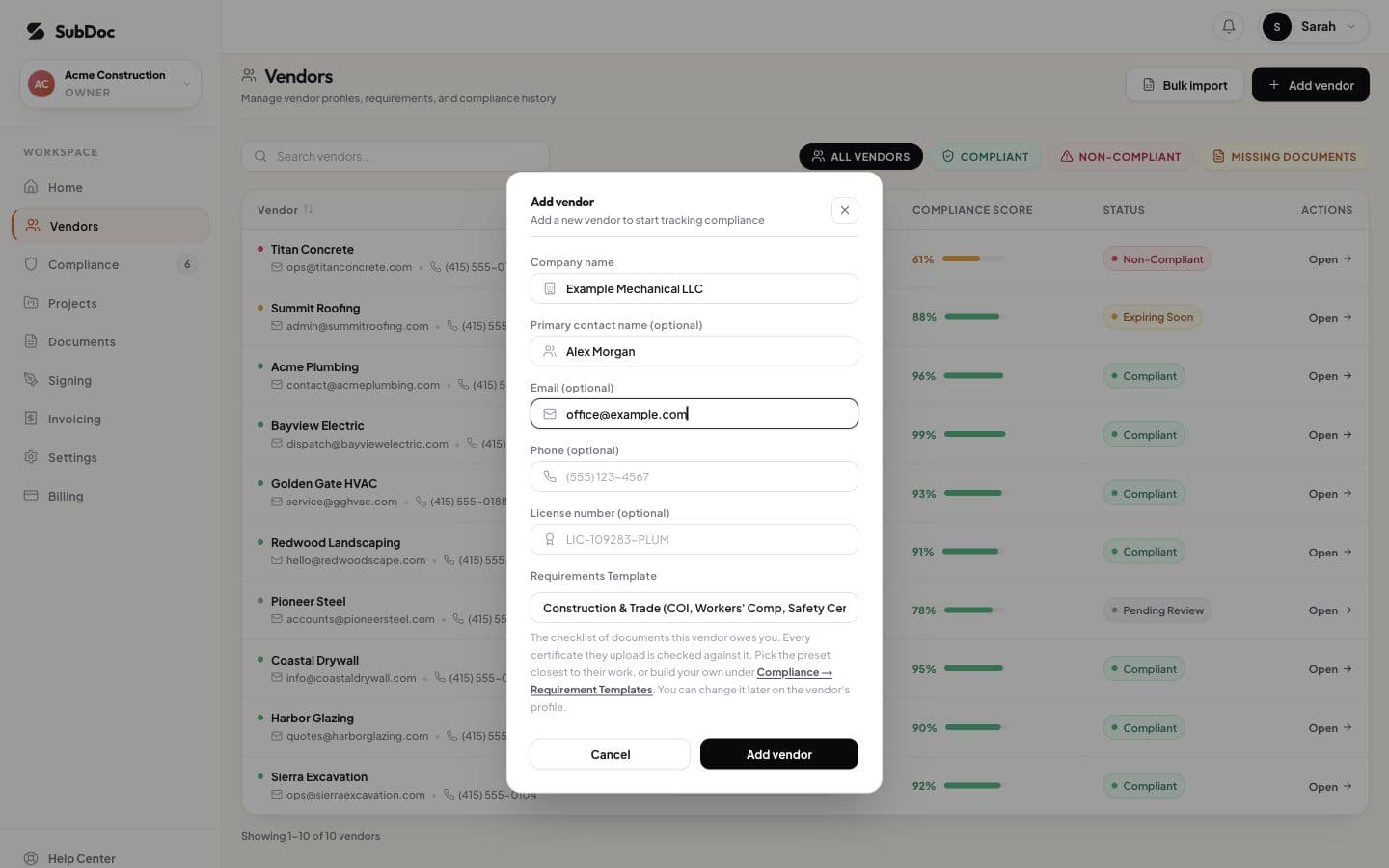
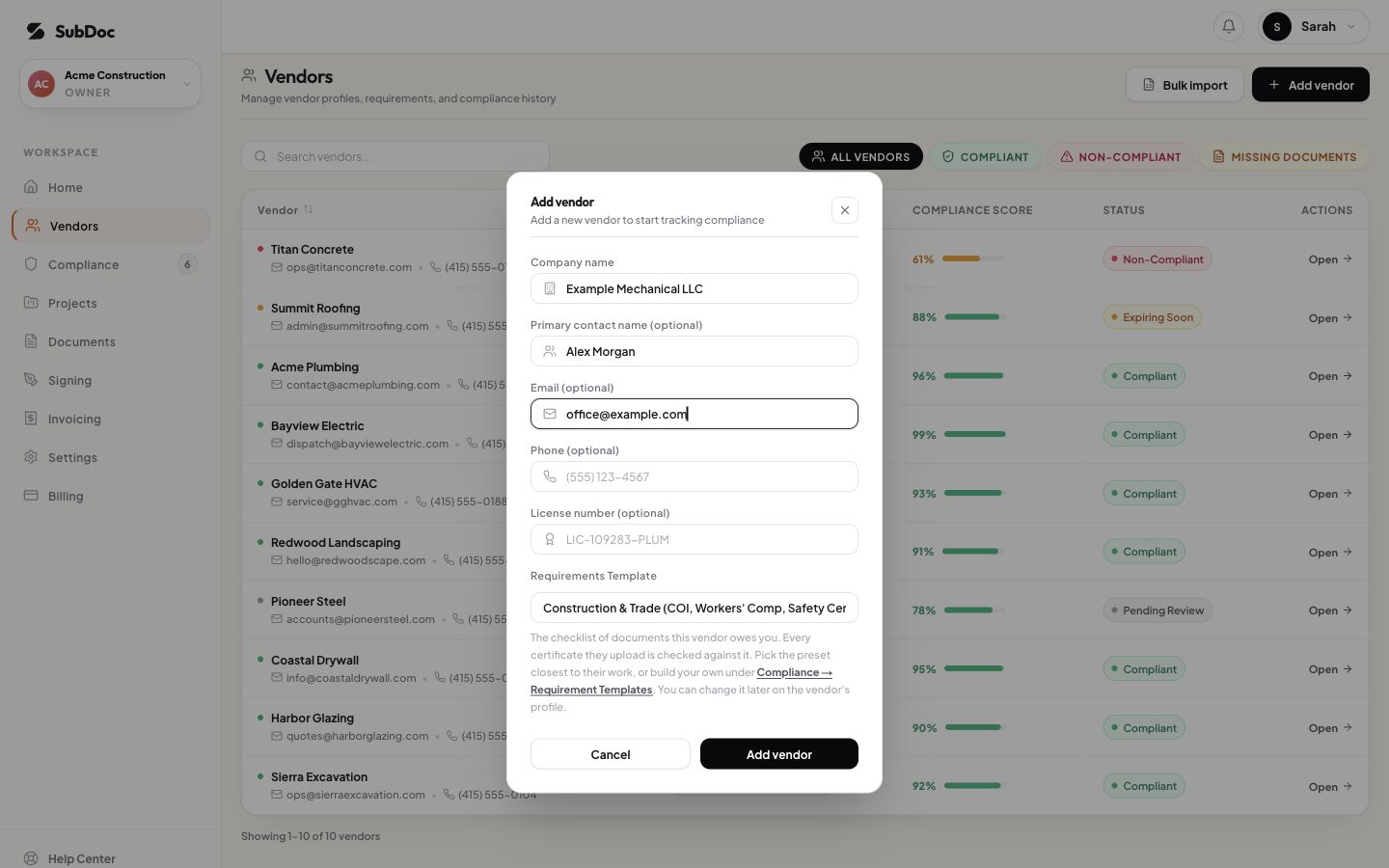
The SubDoc demo shows a vendor-entry form for a company name, contact and requirement template. It illustrates setting up a vendor record; it does not demonstrate financial underwriting, reference checks or automatic prequalification.
Before the handoff, confirm the entity and project, carry forward open questions, identify who owns each follow-up and set the next review trigger. A new work scope, different location, expired evidence or changed staffing plan may require another review. Have the team define those triggers for its process.
Questions before you send the form
- Can a new company respond? Ask for the relevant experience of its proposed team and let the reviewer assess it in context. Do not silently equate a short company history with no relevant experience.
- Does every subcontractor need to answer every question? Mark the purpose and applicability of each request. Keep a reason for anything waived or not applicable.
- How often should the file be renewed? Use your process, the project and the evidence dates to set review triggers. This template does not prescribe a universal annual approval period.
- Can you use a vendor's existing packet? Map it to the requested questions and keep the references. Ask only for the missing information instead of making the applicant retype every answer.
Download the questionnaire and review log. Keep the version you sent, the response and the decision together.