COI tracking software that collects, reads and tracks every certificate
Send each vendor one upload link. SubDoc reads the certificate, checks it against your requirements, and alerts your team before anything expires. Built for general contractors, property managers and facilities teams.
- Free for 3 vendors
- $0 for subcontractors
- No credit card to start
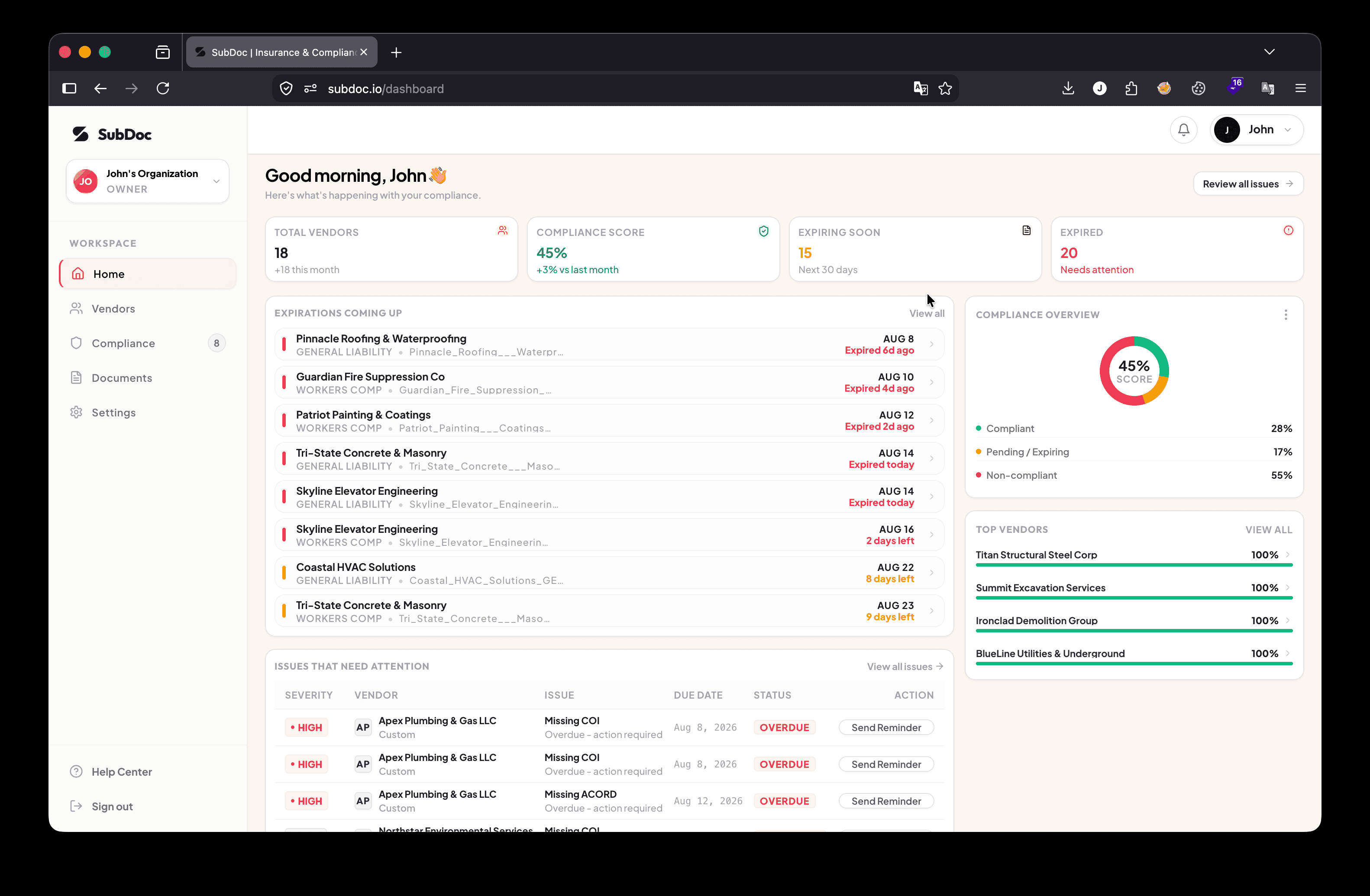
What SubDoc does
SubDoc is COI tracking software for general contractors, property managers and facilities teams. Vendors upload certificates of insurance from a secure link with no account. SubDoc reads each ACORD 25 and checks limits and, on Pro, additional insured, waiver of subrogation and primary and non-contributory against your requirements, and your team approves it. Your team is alerted before policies expire, and invoices from non-compliant vendors can be held. It is free for up to 3 vendors; Pro is $20/month or $96/year for up to 100 vendors.
How COI tracking works in SubDoc
Five steps from vendor list to compliant vendors, most of them automatic.
- 01
Set your requirements
Pick a template for construction, property management or facilities, or build your own: coverage types, minimum limits, additional insured, waiver of subrogation, primary and non-contributory, plus documents such as a W-9 or license.
- 02
Send one upload link
Each vendor gets a secure link with no account or password. They can forward it to their insurance broker, who uploads the certificate directly.
- 03
AI reads, your team approves
SubDoc reads ACORD 25 and ACORD 28 certificates, extracts insurers, policy numbers, dates and limits, and flags anything below your requirements. Nothing is marked compliant until your team approves it.
- 04
Alerts before anything expires
Your team is emailed at 90, 60, 30, 14 and 7 days before a policy or document expires, and on the day it does. One click sends the vendor a reminder with a fresh upload link.
- 05
Hold payment until compliant
Invoices from a non-compliant vendor cannot be scheduled for payment in SubDoc without an owner override. Or export the hold list for QuickBooks or Sage.
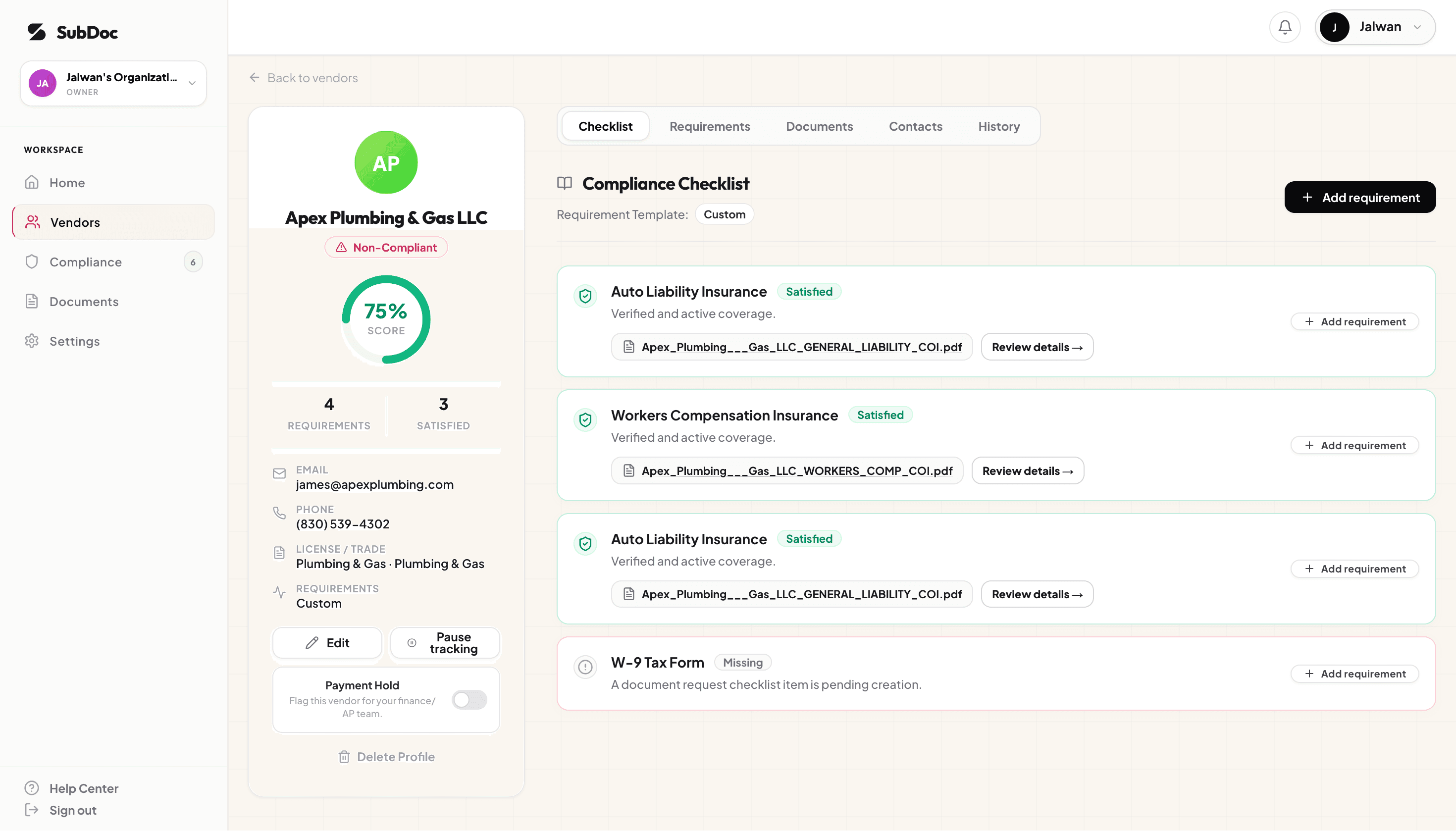
Every vendor’s checklist on one screen
See which coverages and documents each vendor still owes, what expires next, and send a reminder without writing an email.
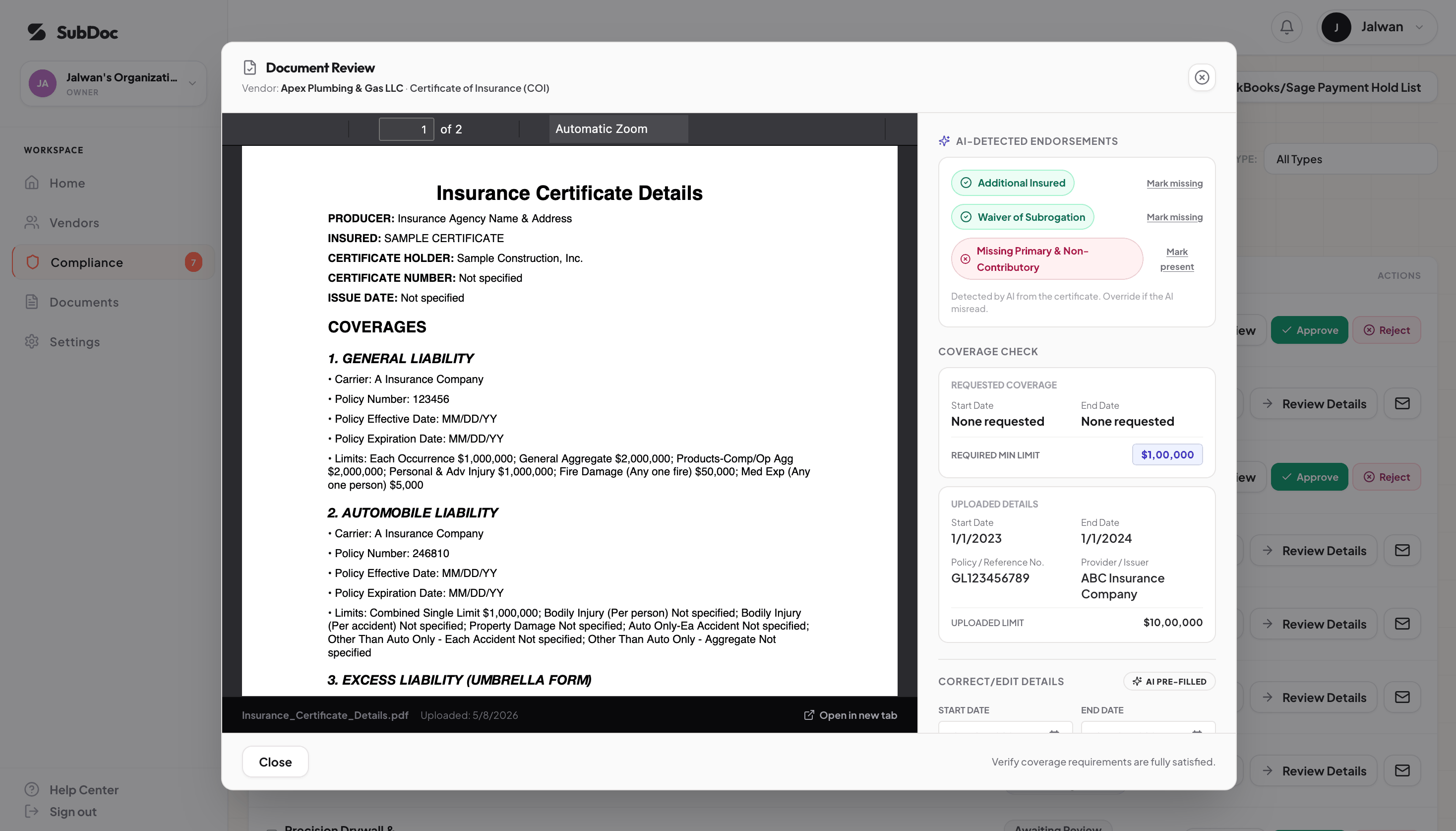
Review a certificate in seconds, not minutes
The certificate and the extracted coverage sit side by side, with anything below your requirements flagged. Approve, or reject with a reason the vendor sees.
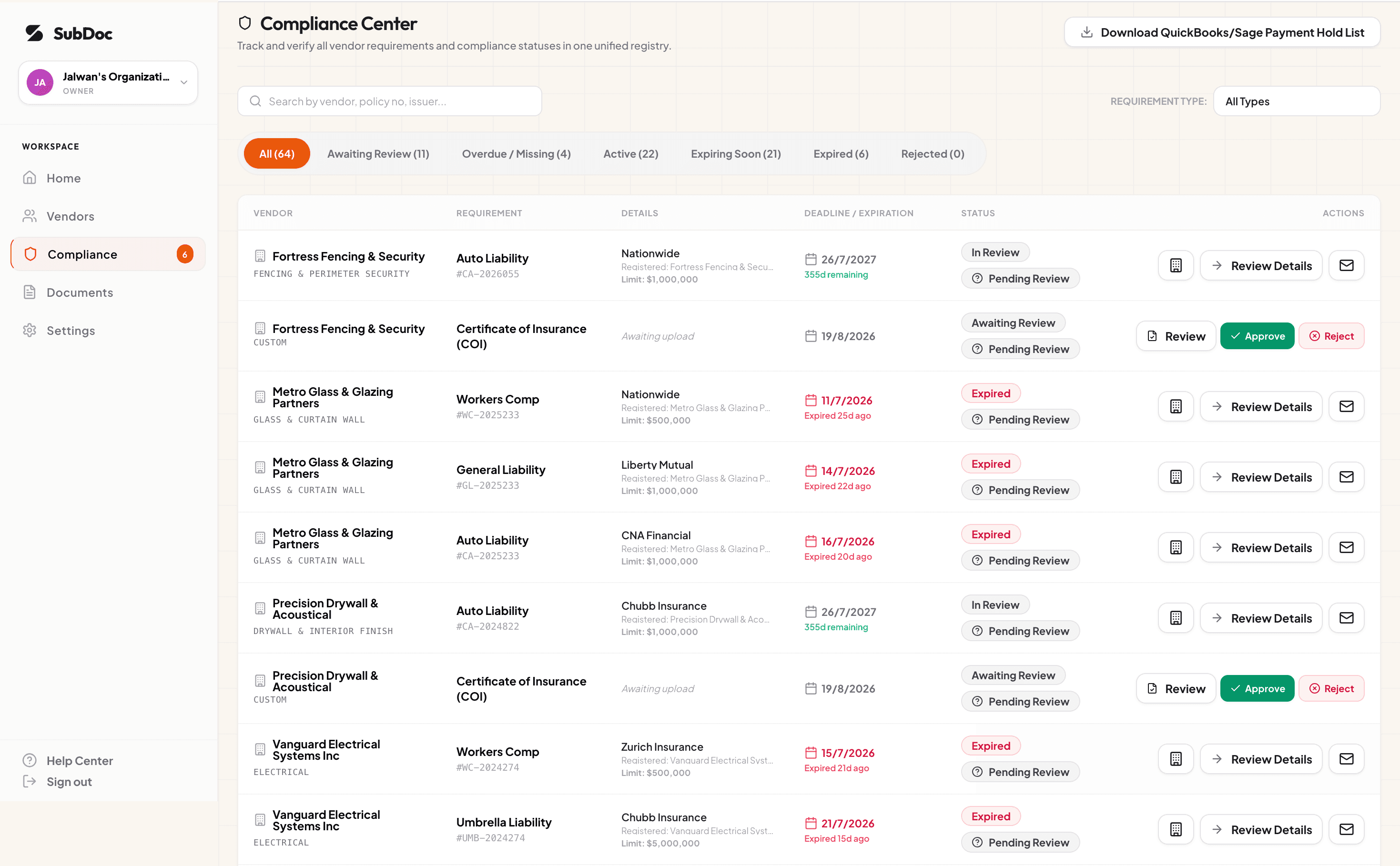
Know who is covered right now
The compliance center lists every vendor that is expiring, expired or missing something, so nothing depends on someone remembering a date.
Built for the teams that collect COIs
Same product, set up for how your team works.
General contractors
Trade-tier limits, subcontract insurance clauses and site-access rules for construction.
Learn moreProperty managers & facilities
Vendor (and tenant) certificates across properties, with W-9s on the same checklist.
Learn moreBeyond insurance
W-9s, licenses, signed subcontracts and lien waivers tracked next to each COI.
Learn moreAccounts payable
Pay subcontractors only when their insurance, W-9 and lien waiver are in.
Learn moreCOI tracking software pricing
Published prices, self-serve signup, and nothing charged to your vendors. Paid plans start with a 14-day free trial.
Starter
$0
Up to 3 vendors, free forever
Pro
$20/mo
or $96/year. Up to 100 vendors
Advanced
$55/mo
or $264/year. Unlimited vendors
How SubDoc compares
Most COI platforms are quote-only. Pricing below is from each vendor's public information; see the linked comparisons for sources and dates.
| Platform | Best for | Starting price |
|---|---|---|
| SubDoc | Small and mid-size general contractors and property managers who want published pricing and a same-day start | Free (3 vendors); $20/mo |
| illumend (from myCOI) | Larger, multi-industry organizations that want AI review backed by a long-established compliance vendor | Quote only |
| Jones | Construction GCs and real estate owners already running Procore, Yardi, MRI or Sage | Quote only |
| TrustLayer | Risk and finance teams tracking many document types across construction, real estate, lending and other industries | Quote only |
| Billy | Construction GCs on Procore, Autodesk or a construction ERP who also want subcontractor prequalification | Quote only |
| bcs | Teams that want a free start, or fully outsourced review at a published per-vendor rate | Free (25 vendors); $0.95/vendor/mo |
Detailed comparisons: COI software alternatives · Best COI tracking software (2026)
Accounting and integrations
Connect QuickBooks Online to import vendors, or export payment-hold lists as CSV for QuickBooks Desktop and Sage. Expiration dates can sync to Google Calendar, and webhooks and Zapier carry compliance changes to your other tools. There is no Procore integration today.
Security
Documents are encrypted at rest with AES-256 and in transit with TLS 1.3, each workspace's data is isolated, and your certificates are never used to train third-party AI models. Read the security overview.
New to COI tracking?
Our guides cover the ACORD 25, the endorsements that matter, and how to run a tracking process with or without software.
Learn the basics
Run it well
Frequently asked questions
What is COI tracking software?
COI tracking software collects certificates of insurance from vendors and subcontractors, reads the coverage on each one, checks it against your requirements, and tracks expiration dates, so nobody works on your job or property without current insurance. It replaces the spreadsheet, shared inbox and calendar reminders most teams start with.
Who is SubDoc built for?
General contractors, specialty trade contractors who manage their own subs, property managers and facilities teams, typically tracking anywhere from a handful to several hundred vendors. Setup is self-serve: no demo or sales call is needed to start.
How does COI tracking work in SubDoc?
You set requirements per vendor type, then send each vendor a secure upload link they can forward to their insurance broker. SubDoc reads each ACORD 25 or ACORD 28 certificate, checks limits and endorsements against your requirements, and your team approves it. Your team is alerted at 90, 60, 30, 14 and 7 days before anything expires, and one click sends the vendor a reminder.
Which endorsements does SubDoc check?
On Pro and Advanced, SubDoc checks whether each certificate shows Additional Insured, Waiver of Subrogation and Primary & Non-Contributory status where your requirements call for them, and can match the additional insured wording you require. It does not read endorsement form numbers such as CG 20 10 or CG 20 37, or notice of cancellation terms, so ask for the endorsement pages when your contract requires specific forms.
Do vendors or subcontractors have to pay or create an account?
No. Vendors and their brokers upload from a secure link with no account, no password and no fee. SubDoc never charges subcontractors.
How much does SubDoc cost?
Free for up to 3 vendors. Pro is $20/month or $96/year for up to 100 vendors. Advanced is $55/month or $264/year for unlimited vendors. Paid plans start with a 14-day free trial.
Can SubDoc hold payments to non-compliant vendors?
Yes. If vendors invoice through SubDoc, an invoice from a vendor that is non-compliant or on payment hold cannot be scheduled or marked paid without an owner override, which is recorded. If you pay outside SubDoc, export the hold list as a CSV for QuickBooks or Sage, or connect QuickBooks Online.
Can I import my existing vendors?
Yes. Import your vendor list from a spreadsheet, or connect QuickBooks Online and review vendors before importing them. Each imported vendor can then be sent an upload link for their current certificate.
Does SubDoc integrate with Procore?
No, there is no Procore integration today. Teams that run projects in Procore use SubDoc alongside it for insurance and vendor documents.
Start tracking certificates of insurance today
Import your vendor list, send the upload links, and see who is covered by the end of the day.