Certificate of Insurance Tracking: Step-by-Step Guide
Table of Contents
If you hire subcontractors or outside vendors, certificate of insurance tracking is one of the most important tasks on your plate. Without it, an expired or missing policy can shift full liability back onto your company overnight.
In this guide, we walk you through a complete certificate of insurance tracking workflow — from collecting COIs during onboarding, to setting coverage thresholds, to automating expiration alerts so nothing slips through the cracks.
Why Spreadsheet-Based Certificate of Insurance Tracking Fails
Most companies start their certificate of insurance tracking process with a simple spreadsheet. They list vendor names, paste in expiration dates, and hope someone checks the file often enough. However, this approach breaks down quickly for three key reasons:
- Human ErrorManual data entry mistakes can easily lead to missed expiration dates.
- Lack of ProactivitySpreadsheets don't send emails. If you forget to check the file, an expired policy can easily go unnoticed.
- Audit DisconnectStoring PDF files on a shared network drive while keeping compliance logs in a separate spreadsheet makes safety audits incredibly slow.
Set Your Certificate of Insurance Tracking Thresholds
Before you start collecting documents, you need to decide what "good" looks like. In other words, set the minimum coverage limits every vendor must meet. These numbers change depending on your industry and contract size, but the table below shows common starting points:
| Policy Type | Standard Baseline Limit | Key Requirement |
|---|---|---|
| General Liability | $1,000,000 / $2,000,000 | Additional Insured Endorsement |
| Workers' Compensation | Statutory Limits / $500,000 | Waiver of Subrogation required |
| Automobile Liability | $1,000,000 Combined Single Limit | Covers hired & non-owned vehicles |
| Umbrella / Excess | $1,000,000 to $5,000,000 | Follows form of underlying policies |
Automate COI Collection During Onboarding
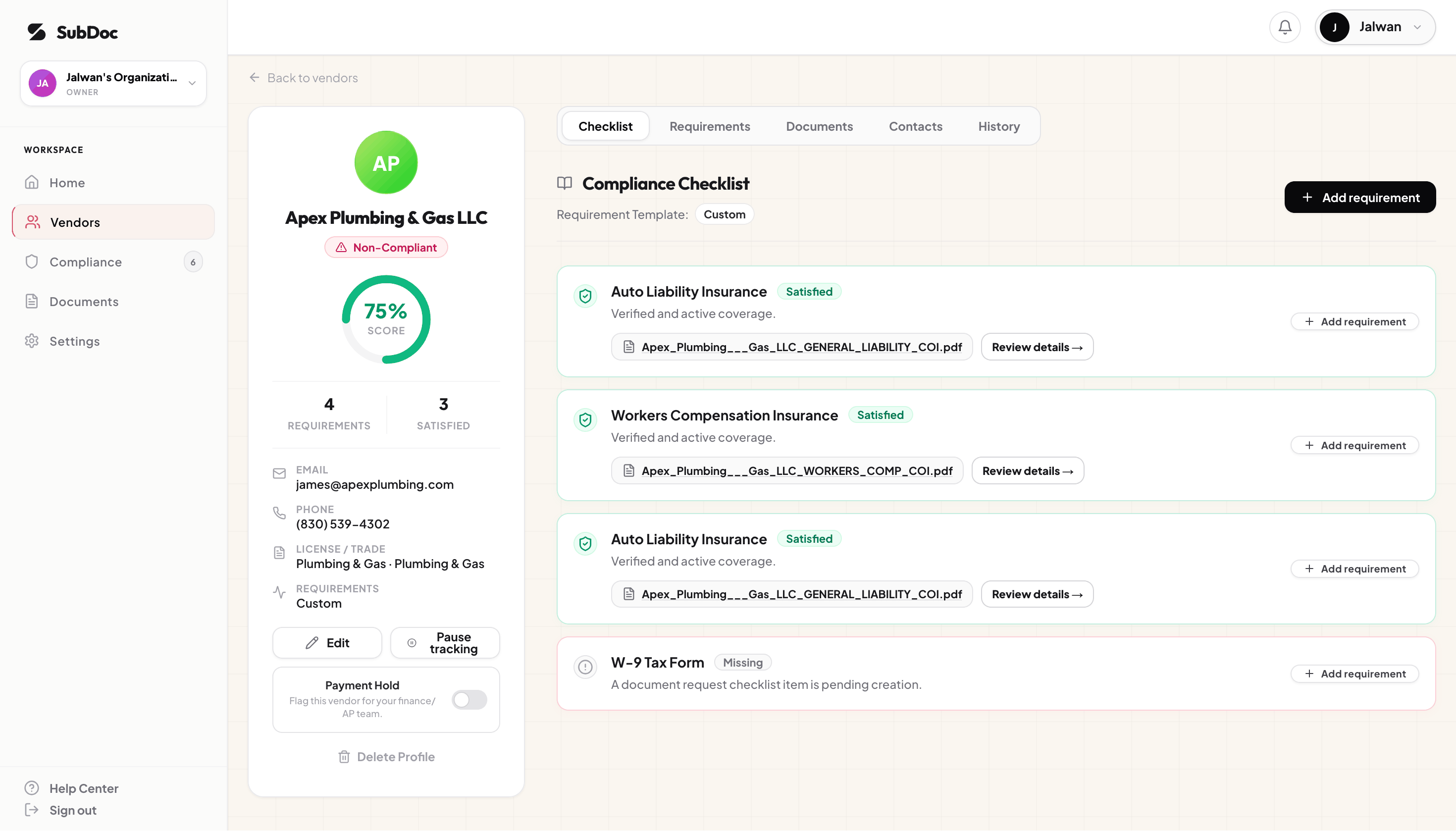
The hardest part of certificate of insurance tracking is getting vendors to send their documents in the first place. If contractors have to download forms, create logins, and fill out long screens, they will put it off — and your project start dates slip.
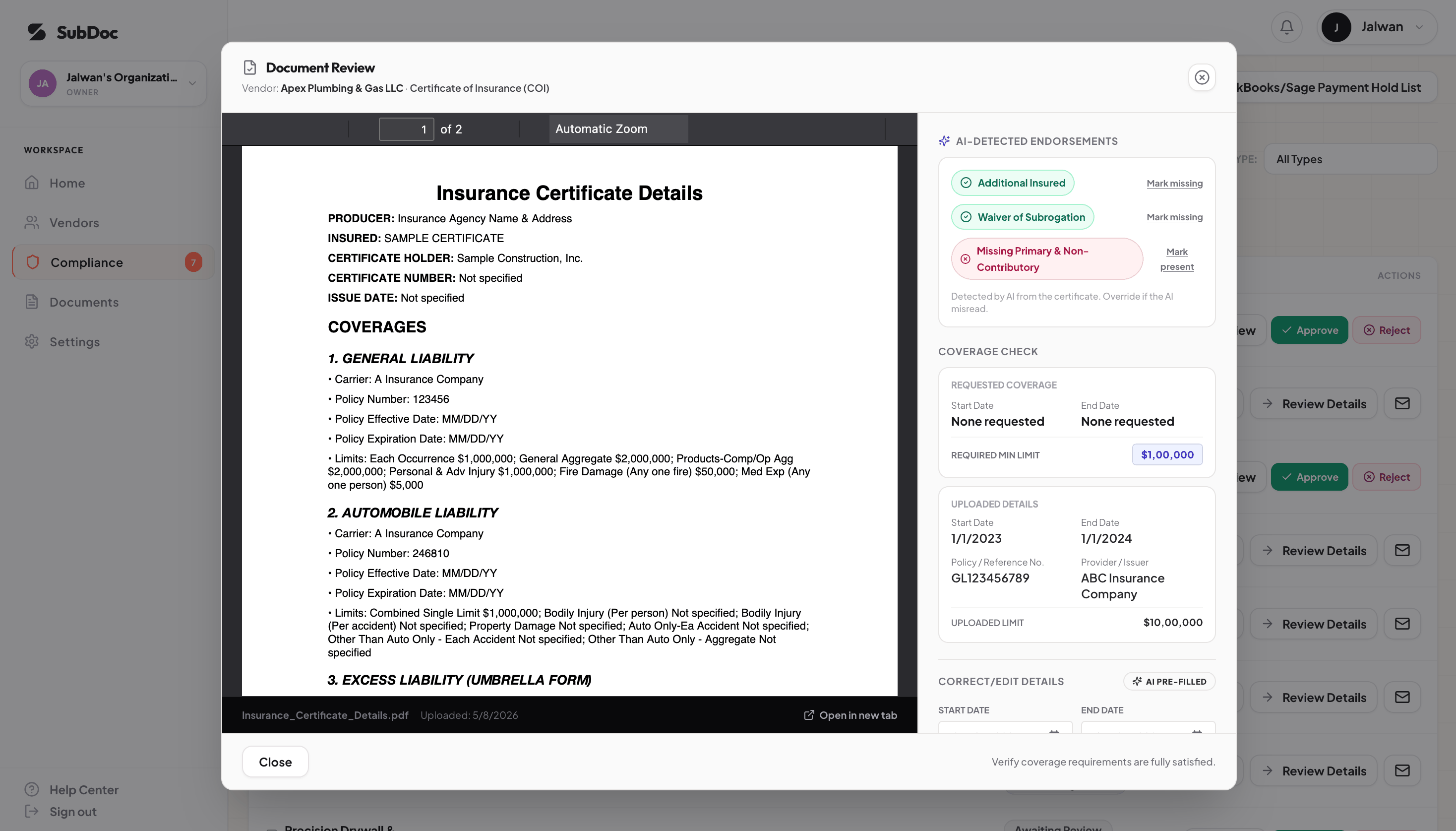
To fix this, use a tool that removes the friction. For example, SubDoc sends vendors a secure magic link so they can upload their certificate of insurance in seconds — no account needed. The system then checks the upload, logs it in your review queue, and sets up expiration alerts right away.
Set Up Automated Certificate of Insurance Tracking Alerts
Collecting a certificate of insurance is only the first step. Since most policies expire every 12 months, your certificate of insurance tracking system needs to watch those dates and alert your team early enough to request the renewal before coverage lapses. A tiered schedule works like this:
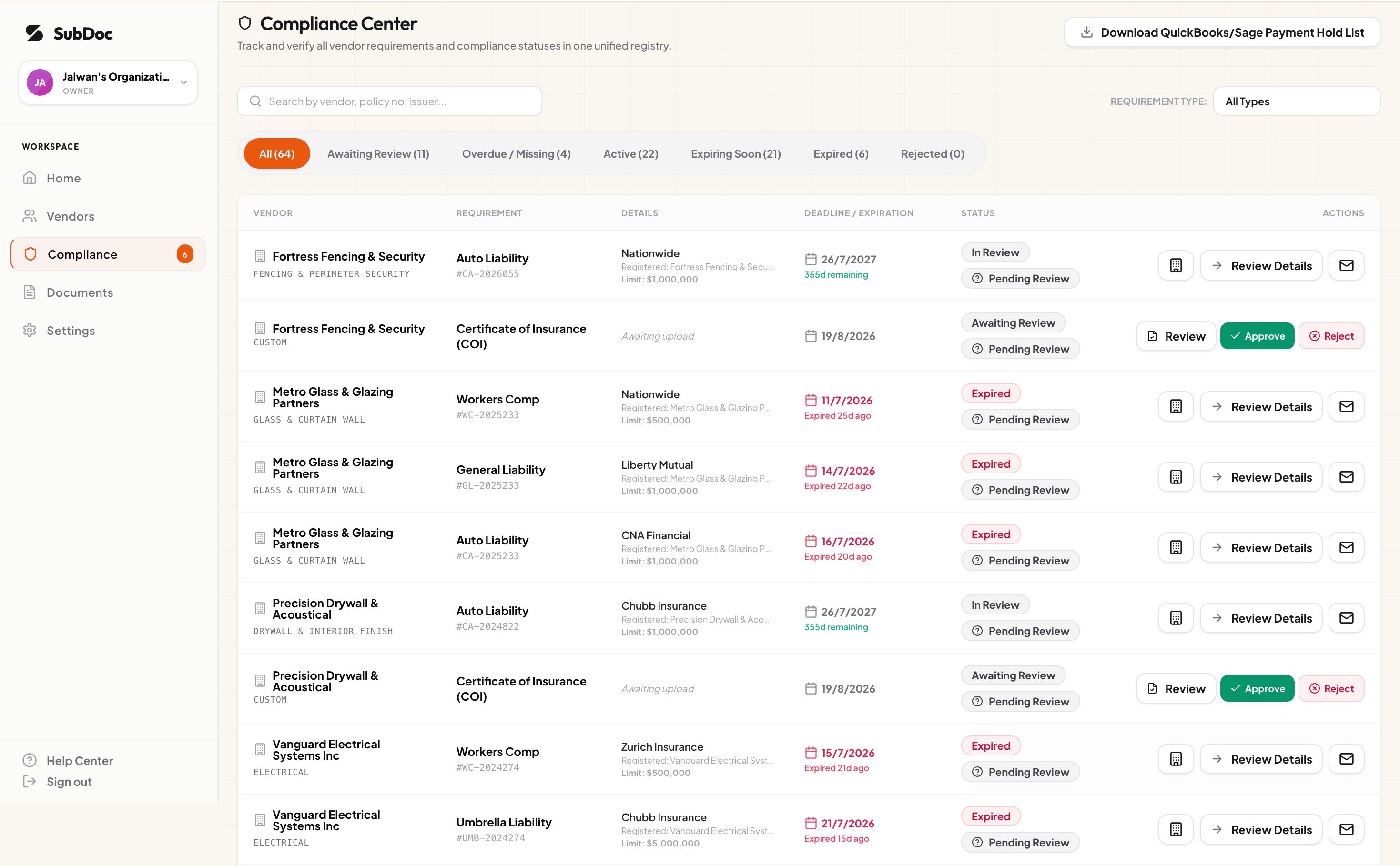
If a policy does lapse, the system should flag the contractor as "Non-Compliant" right away and notify project managers to pause active work until a renewed certificate of insurance is on file.
Roll Out Certificate of Insurance Tracking in 6 Steps
Whether you use a spreadsheet or software, moving an existing vendor list onto a real tracking process goes in the same order. Most teams can do steps 1 to 4 in a day.
- 1Risk-tier your vendorsSort vendors by what they do on site. Roofing, structural and electrical trades are high risk; a delivery-only supplier or an office cleaner is lower. Tiers decide which limits and endorsements each vendor must meet.
- 2Write the requirements for each tierRecord the coverage types, minimum limits and endorsements (additional insured, waiver of subrogation, primary and non-contributory) for each tier, plus documents such as a W-9 or license.
- 3Audit the certificates you already holdGo through the COIs on file and mark each vendor as current, expired, missing a coverage or missing an endorsement. This is your starting backlog.
- 4Request what is missing in one passSend every vendor in the backlog a single request that lists exactly what they owe, so their broker can fix it in one certificate instead of three.
- 5Review each certificate against its tierCheck named insured, dates, limits and endorsements before you approve. Reject with a specific reason so the corrected version comes back right.
- 6Tie compliance to site access and paymentAgree with project managers and accounting that a vendor without a current certificate does not start work and does not get paid. The rule is what makes vendors respond.
Simplify Certificate of Insurance Tracking with SubDoc
Stop tracking insurance documents by hand. SubDoc is purpose-built certificate of insurance tracking software that handles COI collection, coverage validation, and expiration alerts to your team in one dashboard. When a renewal is due, one click sends the vendor a secure upload link they can forward to their broker.
As a result, you spend less time on admin and more time on the work that matters — while every vendor stays compliant without you having to remember a single expiration date.
Frequently Asked Questions
Related Resources
Start Certificate of Insurance Tracking Today
Automate COI verification with AI OCR, manage subcontractor renewals, and keep your projects protected.
Start Free