COI software evaluation
Billy vs GetJones: Compare COI Workflows, Review and Cost
Use the same vendor packet and operating requirements to compare collection, insurance review, follow-up and integration scope.
By SubDoc Editorial Team · Published September 7, 2026 · Updated October 27, 2026
Disclosure: SubDoc publishes this comparison and offers a competing product. This is a review of public documentation, not a hands-on benchmark of Billy or Jones. Product sources were checked October 27, 2026.
For Billy vs GetJones, start with who will run your compliance work. Billy documents company-level requirement groups and document collection. Jones offers a platform with specialist review and an optional Operator service for additional operational support. Both describe construction workflows. Compare the exact service scope, integrations and written quote; do not choose from assumed price ranges or untested speed rankings.
What the current documentation establishes
GetJones is the name readers often use for Jones at getjones.com. The useful comparison is between the contracted workflows, rather than a blanket claim that one product is for contractors and the other only for property managers.
| Question | Billy | Jones |
|---|---|---|
| How are requirements organized? | Its help guide describes company-level groups assigned to vendors, alongside project tracking. | Its Platform page describes records across vendors, tenants, subcontractors, properties and projects. |
| What review model is described? | Its FAQ describes AI analysis and categorization of submitted documents. Confirm the human review and escalation scope in your proposal. | Its Platform documentation describes AI-supported, specialist-reviewed audits. |
| Who handles follow-up? | Its FAQ describes automated document requests and follow-up reminders. | Platform includes automated workflows; optional Operator adds dedicated operational support. |
| How should cost be compared? | Its FAQ directs buyers to a personalized quote. | Its pricing page describes a per-record, per-year model and directs buyers to request a quote. |
Sources: Billy FAQ, Billy company-level guide, Jones Platform, Jones Operator and Jones pricing. These are the vendors' own descriptions; availability and contractual commitments need confirmation.
1. Decide what work you want the provider to own
Write down the person responsible for setting requirements, collecting documents, reviewing exceptions and contacting an unresponsive vendor. Then ask each provider to mark which tasks your team retains and which its contracted service performs.
Jones describes Operator as an optional addition to Platform, rather than a prerequisite for using its software. Ask for the difference in your actual statement of work. For Billy, ask the sales team to specify who reviews ambiguous documents and who owns escalation after an automated reminder goes unanswered.
A suggested responsibility sheet has four columns: task, your owner, provider owner and evidence of completion. “Someone follows up” is incomplete until it names the person or service, the next action and the escalation point.
2. Run the same sample packet through both demos
Prepare fictional or appropriately authorized documents with your broker's help. Include a complete packet, a missing required item, a renewal and a vendor assigned to two projects with different requirements. Do not send real customer information merely to obtain a software demonstration.
- Can the operator see which requirement an uploaded file addresses?
- Can a reviewer distinguish extracted fields from an accepted requirement?
- Where does a missing or ambiguous item appear, and who receives it?
- How is a corrected upload connected to the earlier request?
- Can the team recover the evidence and decision history later?
Record what you actually observe. Time the complete process from request to a reviewed, usable record, including any manual steps. Do not compare one product's text extraction time with another provider's end-to-end insurance review.
3. Test the subcontractor and broker experience
Billy's FAQ says vendors can submit documents through an emailed link without logging in. Have each provider demonstrate its current submission path on a phone and a desktop, including what happens when the original recipient forwards the request to a broker.
During the demo, count the steps before an upload, check whether requirements are understandable, and ask who receives a rejection or correction request. Confirm whether a returned document changes the queue automatically or waits for an administrator. Treat observed results as specific to the workflow and plan demonstrated.
Use our COI request guide to prepare a consistent request. Clear instructions make the comparison more useful than sending different messages to each provider.
4. Verify the integration you actually need
Billy lists Procore, Autodesk, CMiC and Sage 300 among its integrations. Jones lists construction and real estate integrations, including Procore, CMiC, MRI and Yardi. A listed connection is a starting point for questions, not proof that your required fields, permissions and sync direction are included.
Bring a field map to the demo: vendor identifier, project, requirement group, expiration date, compliance status and document link. Ask which system creates each value, which one may overwrite it, and how failed updates are reported. Request the exact integration name and any additional fee in writing.
For a payment-related workflow, have your finance and legal teams define the approval policy separately. A software status should not be treated as independent authority to withhold a payment.
5. Compare the complete quoted cost
Request a written quote for your organization. Billy requests a personalized quote. Jones describes annual record-based pricing, but that is not a dollar quote for your organization. Ask each provider to price the same scope and explain its definition of a billable record.
- Active vendors, projects, entities and expected growth
- Software, review service and managed follow-up scope
- Integrations, onboarding and data cleanup
- Support, training and response commitments
- Renewal terms, minimums and exit/export arrangements
Use two internal columns: quoted fees and your estimated staff effort. Keep those estimates labeled as your assumptions. A lower software invoice may still leave substantial work with your team; a broader service may include tasks you do not need.
A scorecard for your decision meeting
Choose weights before seeing the demos so a polished presentation does not decide the outcome. A suggested approach is to score each criterion from zero to three: not demonstrated, partially demonstrated, demonstrated with manual work, or demonstrated to your requirement.
- Requirement setup matches the projects you manage
- Vendor and broker submission is understandable
- Exceptions have a clear reviewer and escalation owner
- Your integration field map is supported
- Renewal history and exports meet your recordkeeping needs
- The written service scope and price fit the budget
Record the supporting screen, sample export or contract clause beside each score. Leave an unknown blank and assign a follow-up owner. Do not convert a missing answer into a favorable assumption.
Where SubDoc fits in the evaluation
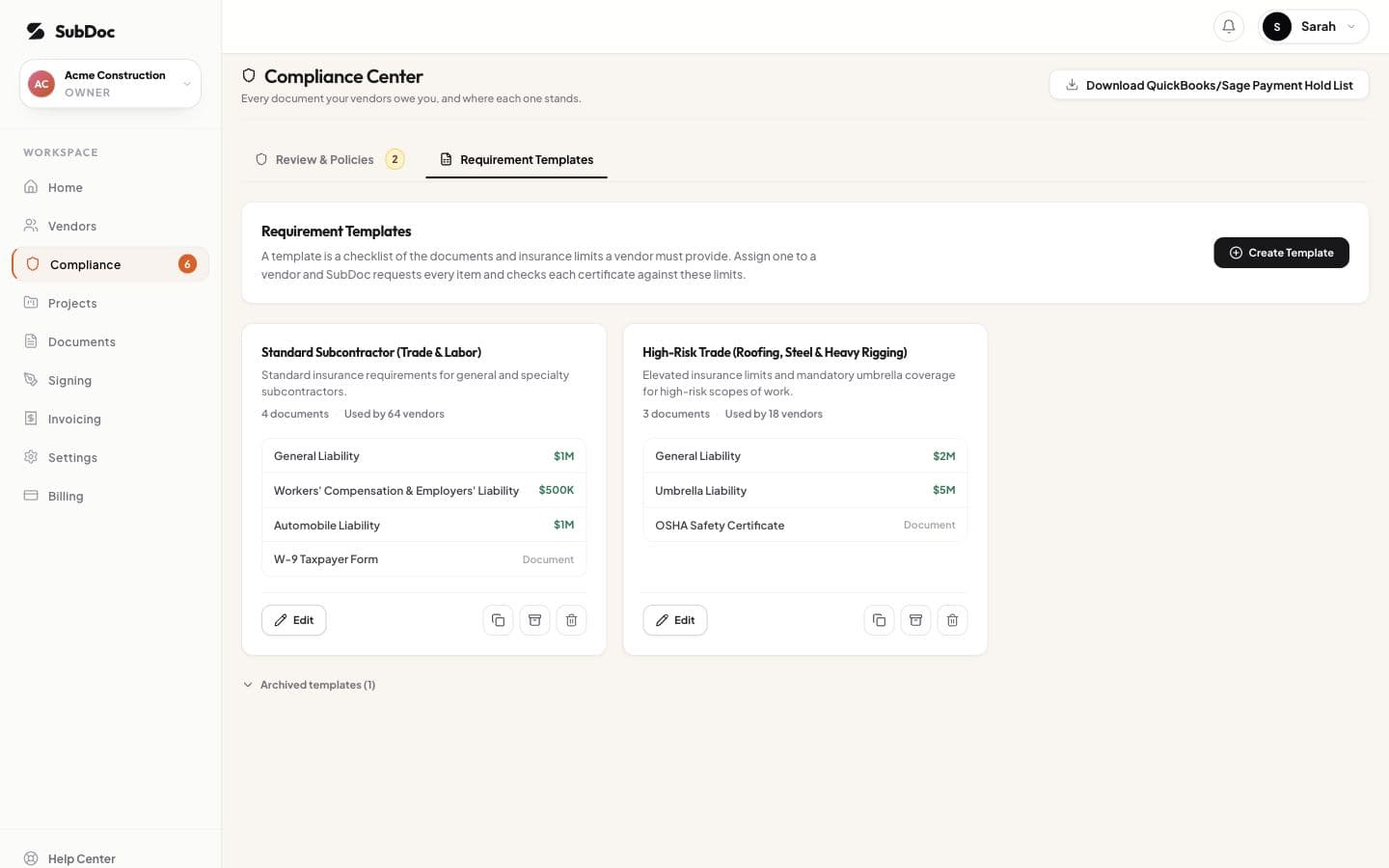
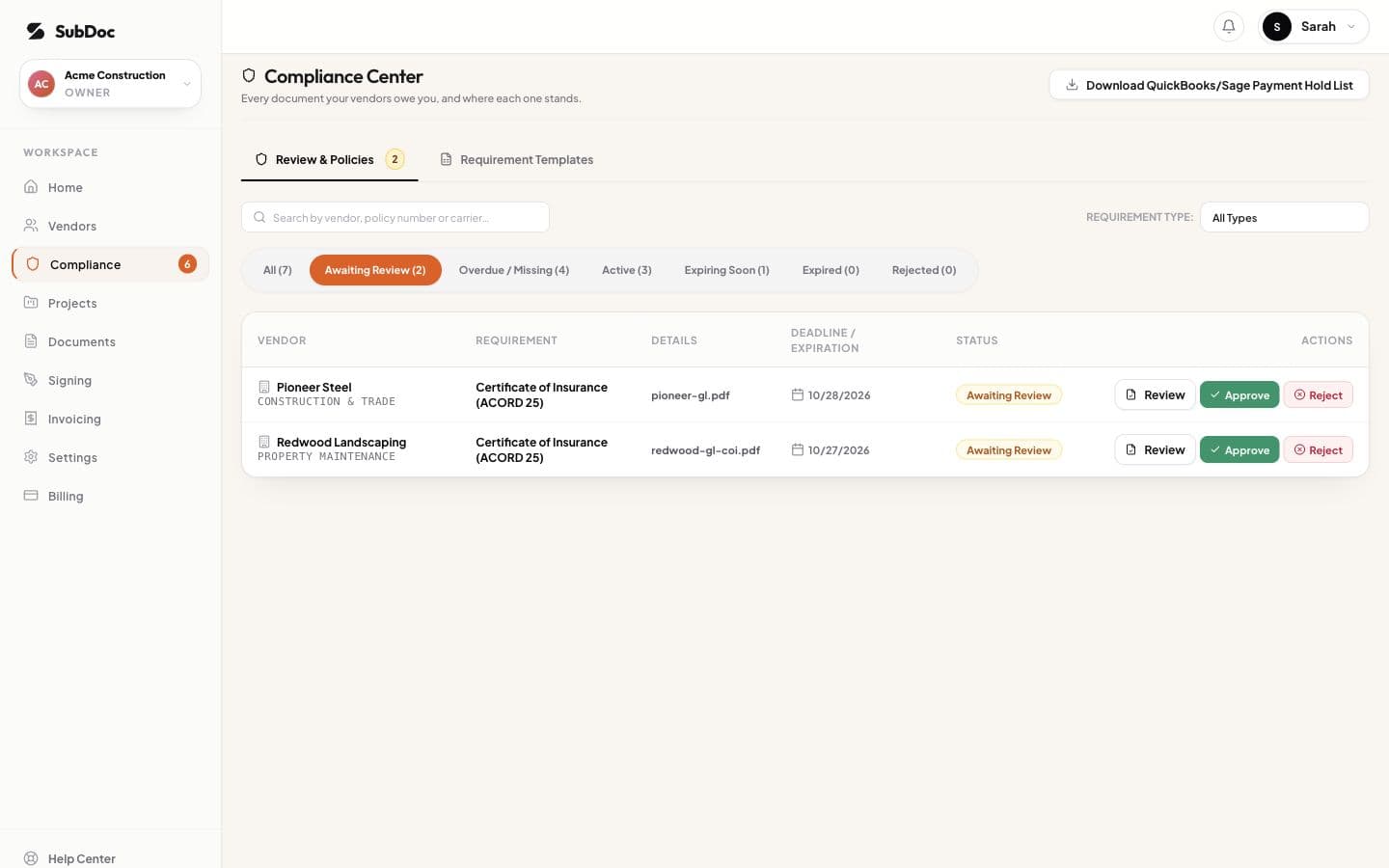
If you are also evaluating SubDoc, use the same checklist. The SubDoc demo shows requirement templates and a document-review queue. Those screens illustrate how records are organized; they do not establish a review SLA or prove that a background process completed.
The template view below shows sample requirements grouped for different vendor situations. During your evaluation, check who approves those requirements and how your team handles exceptions. Example insurance limits are illustrative rather than recommendations.
The queue below shows sample certificates awaiting review. Ask how your own reviewer would identify an outstanding item, find the source document and record the next action. This is an interface illustration, not a successful approval or delivery test.
Explore the SubDoc demo and review current SubDoc plans rather than assuming the features, service scope or prices match another product.
Common questions
Is Jones only for commercial real estate?
No. Its current Platform documentation also identifies general contractors and construction workflows. Evaluate the offered service against your actual projects.
Which is faster, Billy or Jones?
This documentation review does not establish a winner. Run the same packet through both workflows and distinguish upload, extraction, review and exception-resolution times.
Does either product guarantee insurance coverage?
This article makes no such guarantee. Have the appropriate insurance professional review coverage questions; software selection and administrative status are separate decisions.