How to Sign a Subcontractor Agreement Electronically
The complete operational guide for general contractors and trade partners: master ESIGN legal validity, sequential signer routing, onboarding packets, and downstream compliance tracking.
- Access the secure token link: Open the passwordless signing link delivered via email (no recipient account registration required).
- Review the agreement terms: Verify the scope of work, retainage terms, payment milestones, indemnification, and insurance requirements.
- Complete mandatory fields: Fill party details, dates, and click to initial critical safety and indemnification clauses.
- Apply your signature: Draw with a finger/stylus, type using a legal cursive script font, or upload a scanned image of your pen signature.
- Submit & finalize: The platform stamps values, flattens the PDF, appends an audit certificate (with timestamps, IP, and SHA-256 hash), and distributes copies to all parties.
In commercial and residential construction, project timelines rarely tolerate administrative friction. Yet every week, project managers and trade contractors lose critical project momentum to the same antiquated ritual: printing a 30-page Master Subcontract Agreement, chasing handwritten ink signatures in a field trailer, scanning a degraded PDF, and losing the executed file in an unmonitored desktop folder.
Executing subcontractor agreements electronically eliminates this bottleneck. Digital execution allows general contractors (GCs), trade partners, and specialty vendors to formalize agreements in minutes from any device, whether sitting at a desktop in the main office or reviewing plans on a smartphone in the field.
However, executing a construction contract involves more than pasting an image of a signature onto a PDF. Subcontract agreements establish legal risk allocation, indemnification obligations, payment schedules, and insurance thresholds. Ensuring that digital execution is legally enforceable, tamper-evident, and cleanly connected to your broader compliance workflow is essential.
What Is a Subcontractor Agreement?
A subcontractor agreement (also referred to as a subcontract, trade contract, or Master Subcontract Agreement) is a legally binding contract between a prime contractor (or general contractor) and a specialty trade contractor (such as an electrical, plumbing, framing, or HVAC subcontractor).
The agreement defines the rights, responsibilities, and liabilities of both parties for specific project work. Unlike a standard service-level agreement (SLA), a construction subcontract typically contains specialized, high-liability provisions, including:
Scope of Work (SOW)
Explicit descriptions of deliverables, labor, materials, equipment, and exclusions.
Payment & Retainage
Pay-when-paid conditions, progress billing milestones, retainage withholding (typically 5% to 10%), and lien waiver terms.
Indemnification & Defense
Risk-transfer language establishing whether the subcontractor must hold harmless and defend the GC and owner.
Insurance Requirements
Mandates for CGL, Commercial Auto, Workers’ Comp, and Umbrella policies, plus Additional Insured and Subrogation endorsements.
Standard Two-Part Construction Contracting Structure:
- Master Subcontract Agreement (MSA): Executed once during vendor onboarding; governs the overarching legal relationship across all future projects.
- Project Work Order / Exhibit A: Executed per-project; establishes the project address, contract value, and milestone schedule.
Are Electronic Signatures Legally Binding on Subcontractor Agreements?
Yes. In the vast majority of commercial and construction transactions within the United States, electronically signed subcontractor agreements carry the identical legal weight and enforceability of traditional physical paper contracts signed with wet ink.
The Statutory Foundation in the United States
ESIGN Act (2000)
Federal law (15 U.S.C. § 7001 et seq.) governing interstate commerce, establishing that contracts and signatures cannot be denied legal effect solely because they are in digital form.
UETA (1999)
The Uniform Electronic Transactions Act, adopted by 49 states (with NY having ESRA), providing uniform state-level enforceability for electronic records and signatures.
The Four Enforceability Criteria
To withstand legal scrutiny, an electronic execution workflow must demonstrate four key criteria:
The signer takes a deliberate physical action (drawing, typing, or clicking 'Apply Signature') to adopt the agreement.
The signer agrees to execute electronically, typically confirmed via an explicit disclosure notice before signing.
The signature and metadata are permanently embedded and flattened into the PDF document itself.
All parties receive an unalterable, reproducible copy for storage throughout the statutory limitations period.
Why Construction Companies Are Moving Away from Paper
| Operational Feature | Traditional Paper & Scan | Purpose-Built E-Sign (SubDoc) |
|---|---|---|
| Turnaround Time | 5 to 14 business days spent chasing signatures. | Completed in hours or minutes on mobile. |
| Field Accuracy | Subcontractors frequently skip required initials or dates. | Mandatory validation blocks submission until all fields are done. |
| Sequential Control | Subcontractor signs before GC fills out project terms. | Automated sequential routing controls who signs next. |
| Compliance Integration | Contract signing is isolated from W-9 and COI tracking. | Bundles with W-9s and triggers AI COI verification. |
Step-by-Step: How to Sign a Subcontractor Agreement Electronically
Prepare the Agreement & Place Normalized Fields
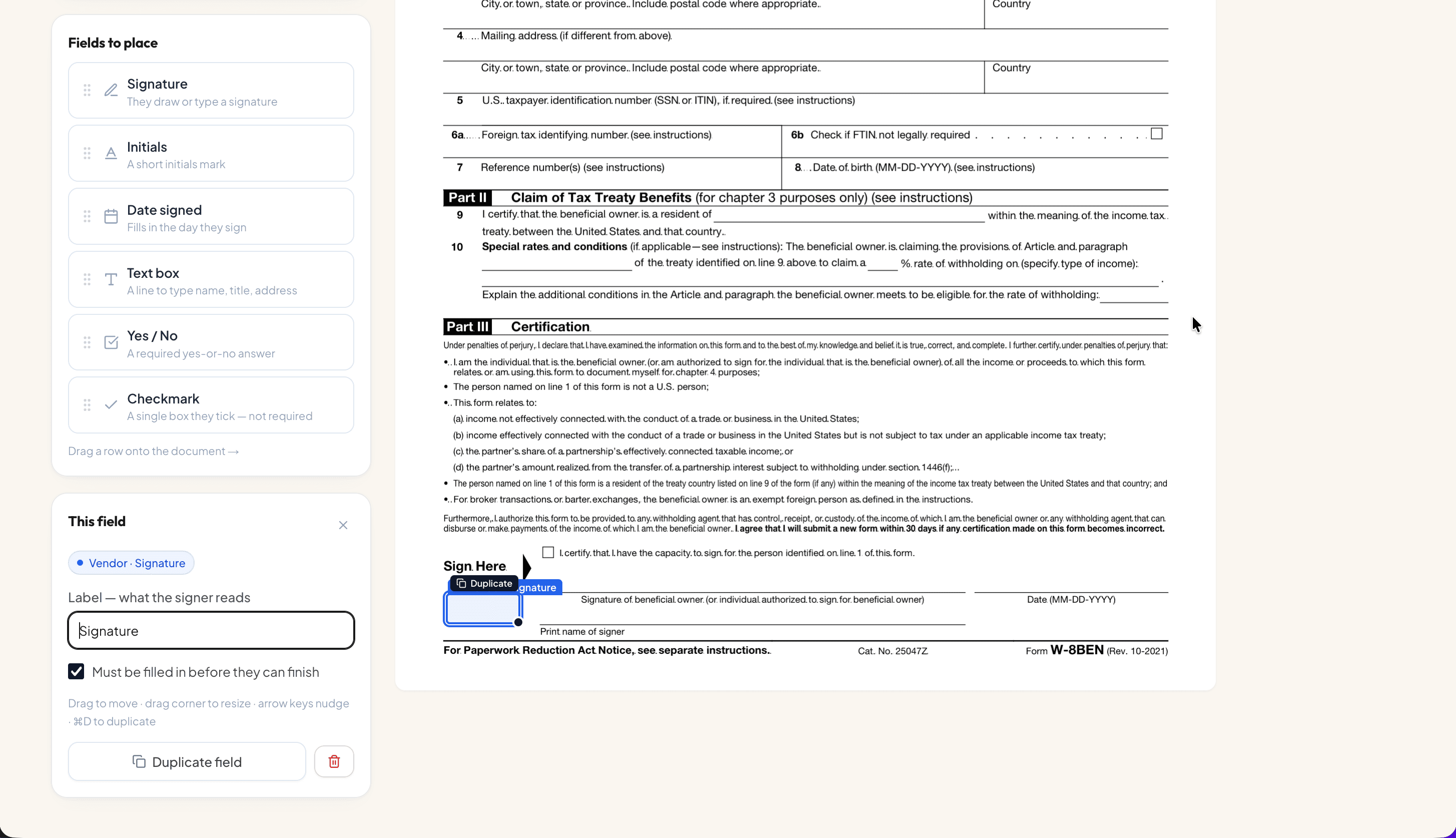
Upload the PDF agreement into SubDoc's Signing Hub. The platform visual editor allows you to position normalized field boxes directly over contract execution lines. You can configure signatures, initials, auto-dates, fillable text boxes, yes/no toggles, and checkboxes.
Assign Signer Roles & Sequential Routing
Subcontracts require execution by both parties. Configure sequential routing so the internal company representative signs first at Order: 1, and the trade partner signs at Order: 2. Marking fields as mandatory ensures signers cannot submit an incomplete document.
Bundle Onboarding Documents into a Unified Packet
Avoid sending four separate emails. In SubDoc, you can group your Master Subcontract Agreement, Company Safety Rules, Job Site Disclosures, and an IRS Form W-9 into a single Signing Packet. Through automated role deduplication, the subcontractor executes every document in one unified browser session.
Dispatch via Passwordless Token Links
Subcontractors working in the field should not be forced to create accounts or install software. SubDoc generates a secure, tokenized signing link (e.g., subdoc.io/sign/[token]) sent straight to the recipient's email. Clicking the link immediately loads the contract on desktop, tablet, or smartphone.
Sign via Draw, Type, or Upload
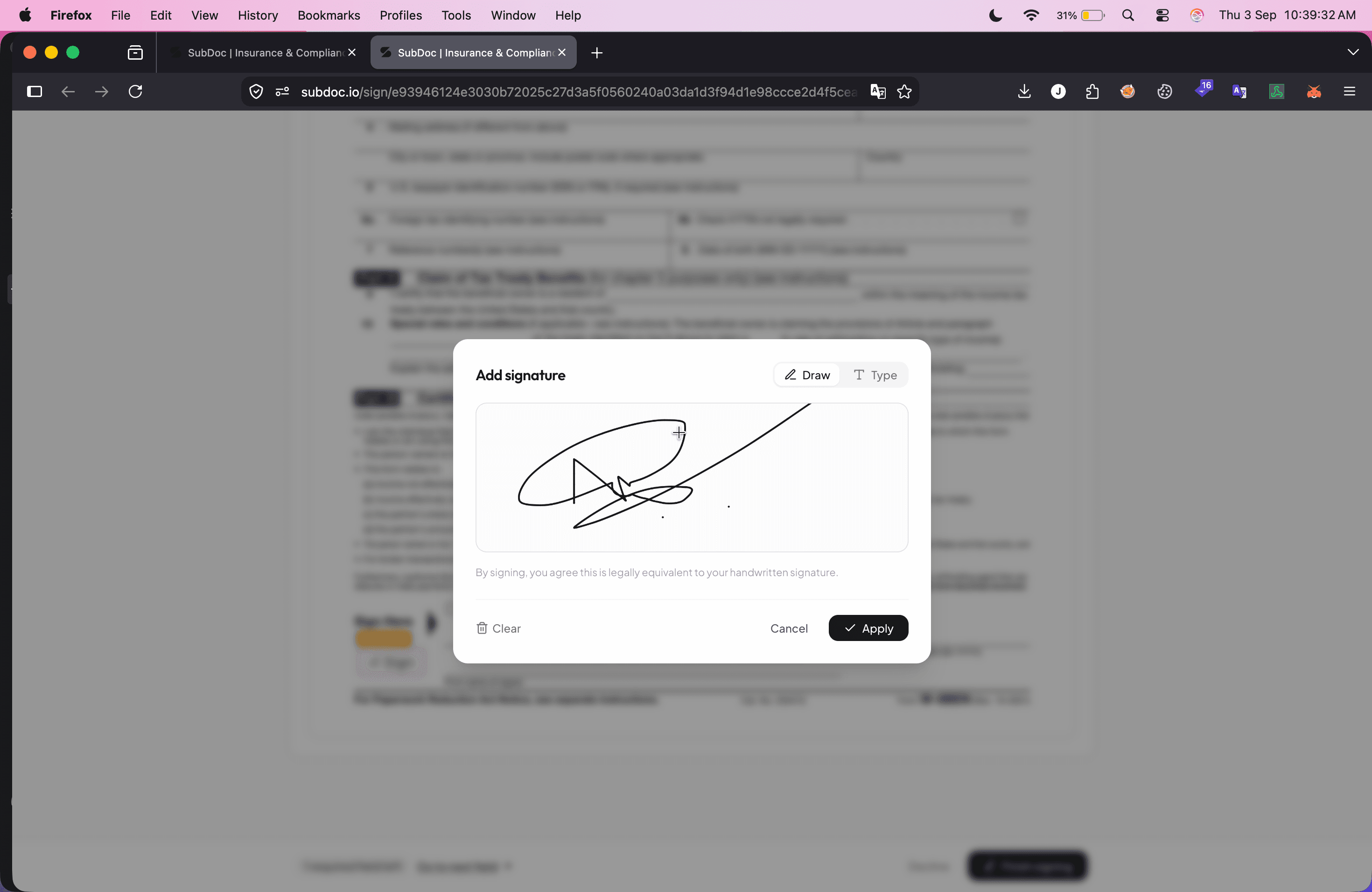
When the subcontractor opens the document, the interface highlights mandatory lines. Clicking a signature box opens the signature modal, offering options to Draw with a finger or mouse, Type with legal cursive typography, or Upload a photo of a pen signature.
Review Stamped Signature, Finalize, and Distribute
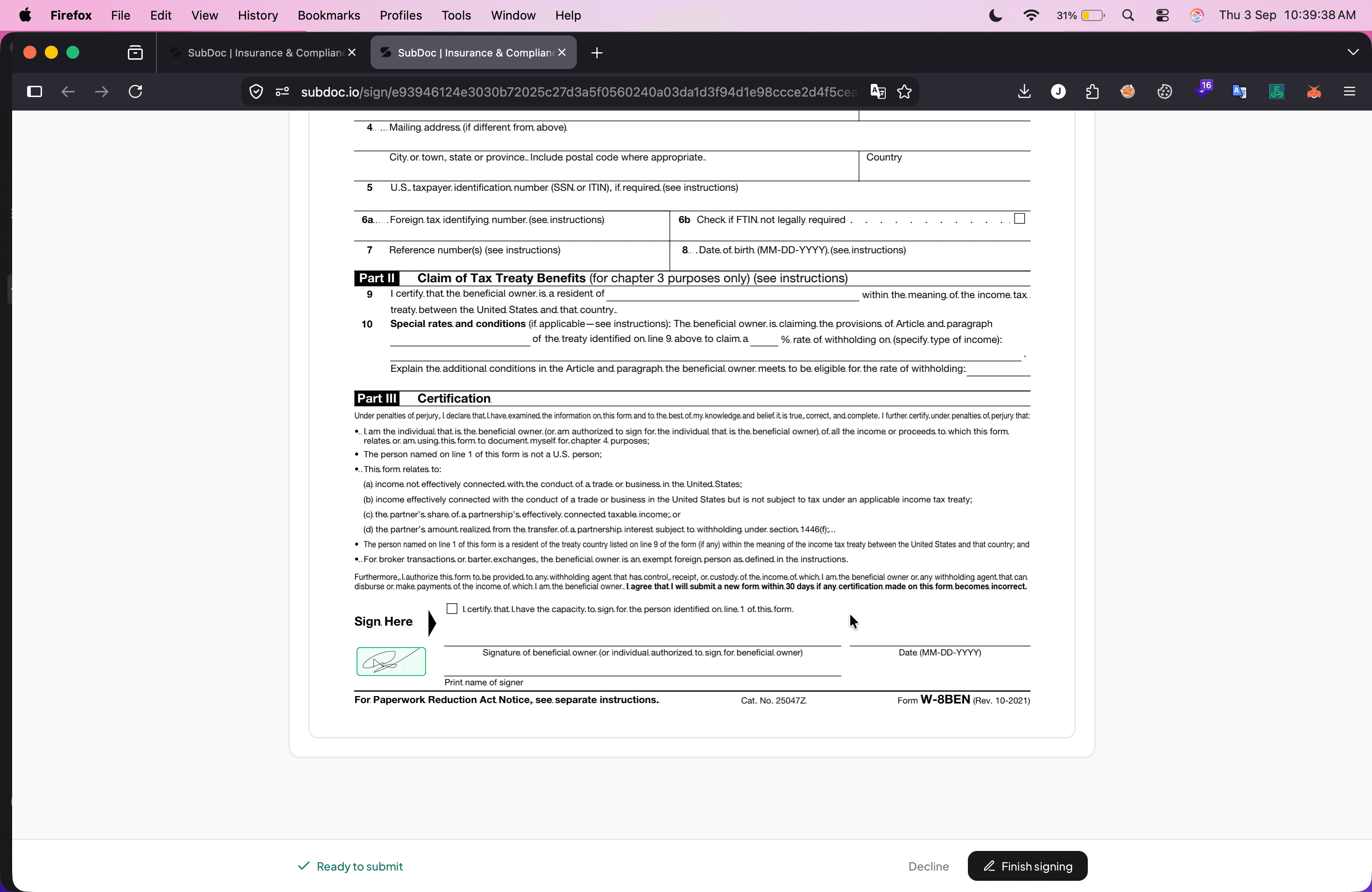
Once the signature is applied, it stamps cleanly onto the contract execution line. The document status updates to Ready to submit with a prominent Finish signing action. Upon submission, SubDoc flattens the PDF, appends an audit certificate containing signer timestamps, IP addresses, and a cryptographic SHA-256 hash, and distributes copies to all parties.
What to Review Before Signing: Subcontractor Checklist
- Accurate Corporate Legal Name: Confirm the contract lists your full registered corporate entity (e.g., "Apex Contracting LLC"), not just a DBA or trade name.
- Scope of Work Exclusions: Ensure work limits, equipment supply obligations, and exclusions align with your accepted bid proposal.
- Payment Terms & Retainage: Clarify progress billing schedules, retainage percentages (e.g., 5% or 10%), and pay-when-paid provisions.
- Insurance Limits Alignment: Review insurance exhibits to verify your active CGL, Auto, and Workers' Comp policies satisfy the mandated limits without requiring costly policy endorsements.
- Change Order Authorization: Verify that extra work requires written authorization prior to commencement to protect against unpaid claims.
Connecting Contracts to Wider Subcontractor Compliance
A signed agreement sitting in an isolated electronic signature account does not protect a general contractor if the subcontractor arrives on site with expired insurance. In construction, contract execution must bridge directly into compliance and financial controls:
E-Sign Agreement & W-9
The subcontractor completes the Master Subcontract Agreement and an IRS Form W-9 in one session, automatically populating their vendor tax profile.
AI COI Verification
The vendor submits an ACORD 25 Certificate of Insurance. SubDoc's AI OCR reads coverage limits and verifies endorsements like Additional Insured and Waiver of Subrogation.
Frequently Asked Questions
Sign Subcontractor Agreements & Track Compliance with SubDoc
Eliminate paper chasing and compliance gaps. Upload PDF agreements, route for electronic signature, collect W-9s, and automate ACORD 25 COI verification in one purpose-built platform.