Subcontractor Agreement E-Signature: Complete Guide
The practical operational manual for general contractors and trade partners: master ESIGN legal validity, sequential signer routing, audit trails, and unified subcontractor compliance workflows.
A subcontractor agreement e-signature is the legally binding, digital execution of a construction subcontract or Master Subcontract Agreement (MSA) using secure electronic signature technology. Governed by the federal ESIGN Act (15 U.S.C. § 7001) and state UETA statutes, electronic signatures carry the same legal validity as physical wet ink signatures when accompanied by documented consent, intentional signing actions, and a tamper-evident audit trail.
In commercial and residential construction, project start dates do not wait for administrative delays. Yet operations teams and project managers routinely lose days—or weeks—chasing physical contract execution: printing 35-page Master Subcontract Agreements, mailing paper packets, tracking down trade owners on job sites for wet-ink signatures, and scanning low-resolution pages into disconnected desktop folders.
Executing subcontractor agreements electronically eliminates this administrative friction. General contractors (GCs), specialty trade contractors, and independent subcontractors can finalize binding agreements in minutes from any device—whether sitting at a desktop in the office or reviewing terms on a smartphone in a job trailer.
However, executing a construction contract requires far more diligence than simply pasting an image of a signature onto a PDF. Subcontracts establish critical risk transfer, indemnification boundaries, retainage schedules, and insurance thresholds. Ensuring that digital execution is enforceable, tamper-evident, and cleanly integrated into your subcontractor compliance workflow is paramount.
1. What Is a Subcontractor Agreement?
A subcontractor agreement (also referred to as a trade contract, master subcontract, or independent contractor agreement) is a legally enforceable contract between a prime contractor (general contractor) and a specialty trade contractor (such as an electrical, plumbing, framing, concrete, or HVAC firm).
The agreement establishes project scope, compensation structures, scheduling commitments, and liability protections. Unlike generic service vendor contracts, construction subcontracts contain specialized, high-liability clauses that demand strict legal clarity:
Scope of Work (SOW)
Defines specific trade responsibilities, performance specifications, furnished materials, equipment provisions, and explicit work exclusions.
Payment & Retainage Terms
Stipulates progress billing schedules, pay-when-paid or pay-if-paid clauses, retainage percentages (standard 5% to 10%), and mandatory lien waiver exchanges.
Indemnification & Defense
Transfers risk by defining whether the subcontractor must hold harmless, indemnify, and defend the GC and property owner against third-party claims.
Insurance & Endorsement Limits
Mandates Commercial General Liability (CGL), Commercial Auto, Workers' Compensation, and Umbrella policies, along with Additional Insured and Waiver of Subrogation endorsements.
The Two-Tier Construction Contracting Framework:
- Master Subcontract Agreement (MSA): Executed once during initial trade partner onboarding; governs all ongoing and future legal relationships across multiple projects.
- Project Work Order / Exhibit A: Executed per specific job site; specifies contract sums, unit pricing, milestone deadlines, and project-specific safety plans.
2. Can Subcontractor Agreements Be Signed Electronically?
Yes. In the United States and most developed jurisdictions, electronically signed subcontractor agreements are legally valid and enforceable with the identical legal standing of ink-signed paper contracts.
The Legal Framework in the United States
ESIGN Act (Federal)
The federal Electronic Signatures in Global and National Commerce Act (15 U.S.C. § 7001 et seq.) dictates that a signature, contract, or other record relating to interstate commerce cannot be denied legal effect, validity, or enforceability solely because it is in electronic form.
UETA (State-Level)
The Uniform Electronic Transactions Act has been adopted by 49 U.S. states, the District of Columbia, Puerto Rico, and the U.S. Virgin Islands (with New York adopting the Electronic Signatures and Records Act / ESRA), establishing that electronic records satisfy statutory writing requirements.
The Four Criteria for Legal Enforceability
Under both ESIGN and UETA, simply pasting a graphic of a signature onto a PDF is insufficient if challenged in litigation. A legally defensible electronic execution workflow must demonstrate:
The signer takes a deliberate physical action (drawing, typing, or clicking 'Apply Signature') indicating adoption of the agreement terms.
The signer receives and acknowledges an explicit disclosure consenting to conduct transactions electronically prior to execution.
The signature and metadata are permanently embedded and flattened into the PDF document itself, preventing detachment.
All parties receive an unalterable, reproducible copy for storage throughout the applicable statute of limitations or repose.
3. Electronic Signature vs. Digital Signature: Understanding the Difference
Although often used interchangeably, electronic signature and digital signature refer to distinct concepts in legal technology:
| Dimension | Electronic Signature (E-Sign) | Digital Signature (Cryptographic) |
|---|---|---|
| Legal Definition | A legal concept representing a person's intent to sign and adopt an electronic document (ESIGN / UETA). | A cryptographic technical mechanism used to secure, authenticate, and verify document integrity. |
| Primary Purpose | Proves consent, execution intent, and party authorization. | Proves the document has not been altered or modified since signing (tamper evidence). |
| Mechanism | Drawn signature, typed cursive script, or uploaded pen signature image. | Public Key Infrastructure (PKI), asymmetric encryption, and SHA-256 mathematical hashing. |
| SubDoc Application | Recipients draw, type, or upload signatures with statutory consent disclosure. | Stamps values, flattens PDF layers, and appends a SHA-256 hashed audit certificate. |
In modern construction compliance, an effective platform combines both: providing a seamless, user-friendly electronic signature experience for trade contractors in the field, backed by immutable digital signature cryptographic audit logging behind the scenes.
4. How Subcontractor E-Signatures Work
The modern e-signing workflow replaces printing and manual scanning with an automated digital sequence:
Field Normalization & Tagging
The general contractor uploads a contract PDF and tags execution fields: signatures, initials, dates, and text inputs, assigning each field to specific signer roles.
Tokenized Passwordless Dispatch
The platform generates an encrypted, single-use token link delivered via email or SMS. Signers open the document without requiring app downloads or account logins.
Input Validation & Capture
Signers review terms on mobile or desktop and complete mandatory inputs. The interface prevents submission until all designated execution lines are completed.
Cryptographic Flattening & Audit Trail
The platform burns captured inputs into the PDF binary, flattens all form layers, computes a SHA-256 document fingerprint, and appends a court-ready audit certificate.
5. What to Check Before Sending a Subcontractor Agreement
Prior to dispatching a contract for digital execution, verify these critical checkpoints to avoid disputes:
- Exact Registered Corporate Entity Name: Confirm the subcontractor is listed under their official state registered legal name (e.g., "Apex Mechanical Services LLC") rather than an informal trade name or DBA.
- Scope of Work Exclusions: Ensure the project exhibits accurately define equipment provisions, crane hoisting, temporary utility hookups, and cleanup obligations.
- Retainage & Progress Billing Schedule: Confirm agreed-upon retainage withholding percentages (typically 5% or 10%) and payment cycle dates.
- Insurance Limits Alignment: Cross-reference contract insurance exhibits against the subcontractor's active ACORD 25 Certificate of Insurance to prevent post-signature compliance stalls.
- Authorized Signer Verification: Ensure the recipient email belongs to an officer, managing member, or authorized representative with corporate legal power of attorney.
6. How to Send a Subcontractor Agreement for E-Signature
In construction, adoption hinges on simplicity. Trade contractors operating in the field will ignore complex signature requests that require creating new usernames, remembering passwords, or installing mobile applications.
The Advantage of Passwordless Token Links
Modern platforms like SubDoc utilize secure, tokenized URLs (such as subdoc.io/sign/[secure-token]). When the recipient taps the link from their email or text message, the document immediately loads in their browser:
- Zero Friction: No account creation, app store downloads, or password resets.
- Mobile Optimized: Built-in pinch-to-zoom, auto-scrolling to required fields, and touch-responsive canvas signing.
- Expiring Tokens: Links expire automatically after configurable windows to protect document confidentiality.
7. How Multiple Parties Sign: Sequential Routing & Countersignatures
Construction subcontracts are bilateral agreements requiring execution by both the general contractor and the trade partner. In many organizations, project managers must complete terms before an executive countersigns.
Sequential Signer Routing (Standard)
Signers receive the contract in strict numerical order. The document cannot advance to the next participant until the prior signer completes all designated fields.
Parallel Signer Routing
All designated signers receive execution links simultaneously. Useful when multiple trade partners or joint venture partners need to sign independently without dependencies.
8. What Happens After Everyone Signs?
Once all parties have completed execution, the signing engine finalizes the record:
9. How to Store Signed Subcontractor Agreements
Storing executed contracts across scattered email inboxes, local desktop downloads, and unorganized cloud drives introduces catastrophic legal risk. If a defect claim or indemnity dispute arises five years after project completion, locating the exact signed agreement and audit trail is critical.
Retention Guidelines for Construction Subcontracts
- Statute of Repose:Retain executed contracts for the duration of your state's construction defect statute of repose (typically 6 to 10 years following substantial completion).
- Tax & 1099 Audits:IRS regulations require retaining contract agreements and associated W-9 forms for at least 4 to 7 years to support subcontractor tax classification audits.
- Centralized Indexing:Maintain contracts inside a unified vendor profile alongside insurance policies, preventing orphaned agreements when project managers leave your company.
10. Connecting E-Signatures to Subcontractor Onboarding & Compliance
A signed agreement sitting in an isolated electronic signature account provides zero operational protection if the trade contractor steps foot on the job site without active liability insurance or a verified tax ID.
In construction, contract execution must serve as the gateway into comprehensive subcontractor compliance:
Execute MSA & Form W-9
Bundle the Master Subcontract Agreement and an IRS Form W-9 into a single Signing Packet. Subcontractors execute both documents in one session, automatically establishing their vendor tax profile.
AI COI Verification
The trade submits an ACORD 25 Certificate of Insurance. SubDoc's AI OCR reads policy limits and verifies mandatory Additional Insured and Waiver of Subrogation endorsements.
11. Common Subcontractor E-Signature Mistakes to Avoid
Sending Unflattened Form PDFs
Sending editable PDFs without cryptographic flattening allows recipients or third parties to alter contract wording or payment figures after execution. Always ensure your signing engine locks the file.
Failing to Generate a Court-Ready Audit Trail
A standalone signature graphic on a PDF provides weak evidence in an indemnity lawsuit. A defensible e-signature requires recorded timestamps, signer IP addresses, user agents, and SHA-256 document hashing.
Permitting Field Execution Out of Sequence
Sending an agreement simultaneously to both parties can lead to the subcontractor signing before the GC fills out project terms and contract values. Use sequential routing so Order 1 precedes Order 2.
Isolating Contracts from Insurance Tracking
Keeping executed subcontracts in an e-sign tool while tracking insurance in spreadsheets creates blind spots. When an uninsured subcontractor experiences a job site injury, the GC faces direct workers' compensation liability.
How to E-Sign a Subcontractor Agreement with SubDoc
SubDoc's Signing Hub is purpose-built for construction contractors, trade specialists, and commercial vendors. Here is the realistic step-by-step workflow:
Prepare the Subcontractor Agreement & Place Fields
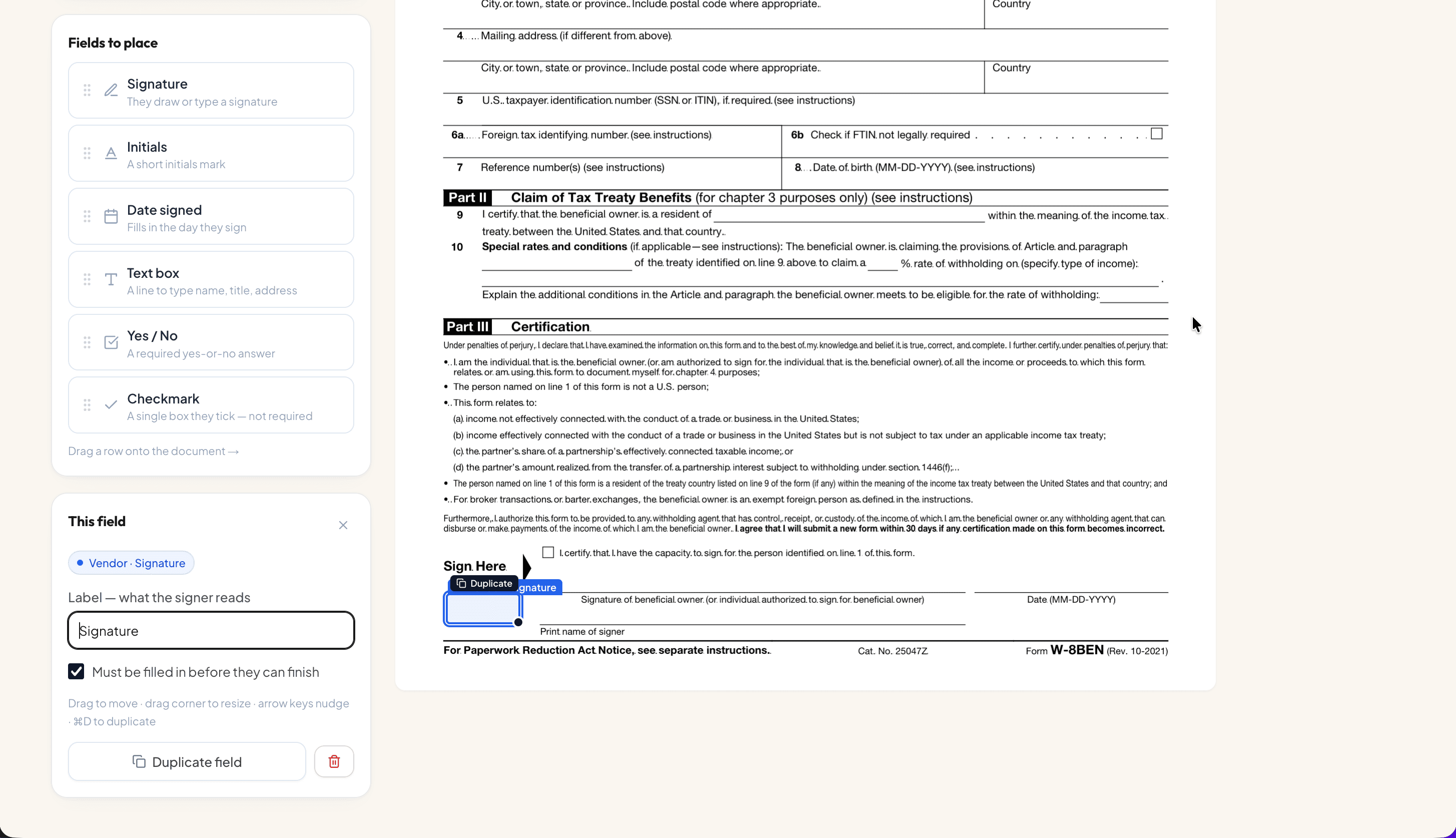
Upload your subcontract PDF into SubDoc. The visual field editor allows you to drag normalized field tags—including Signature, Initials, Date signed, Text box, Yes/No, and Checkmark—directly onto contract execution lines. You can assign fields to specific roles (e.g., "Vendor - Signature") and enforce mandatory completion.
Add Required Signer(s) & Configure Sequential Routing
Add your internal GC representative and the trade partner representative. Set up sequential order so the internal team fills project details at Order: 1, and the subcontractor receives the invitation at Order: 2. SubDoc guarantees that uncompleted documents cannot advance out of order.
Send the Agreement for Signature
Dispatch the agreement with a single click. SubDoc sends an encrypted, passwordless token link (e.g., subdoc.io/sign/[token]) directly to the trade partner's email or phone, allowing them to open the contract immediately on mobile or desktop without account registration.
Monitor the Signing Process in Real Time
Track document status from your SubDoc dashboard: monitor when invitations are sent, opened, and executed. Automated reminder notifications keep trade partners on track without requiring manual follow-up calls from your project managers.
Sign via Draw, Type, or Upload
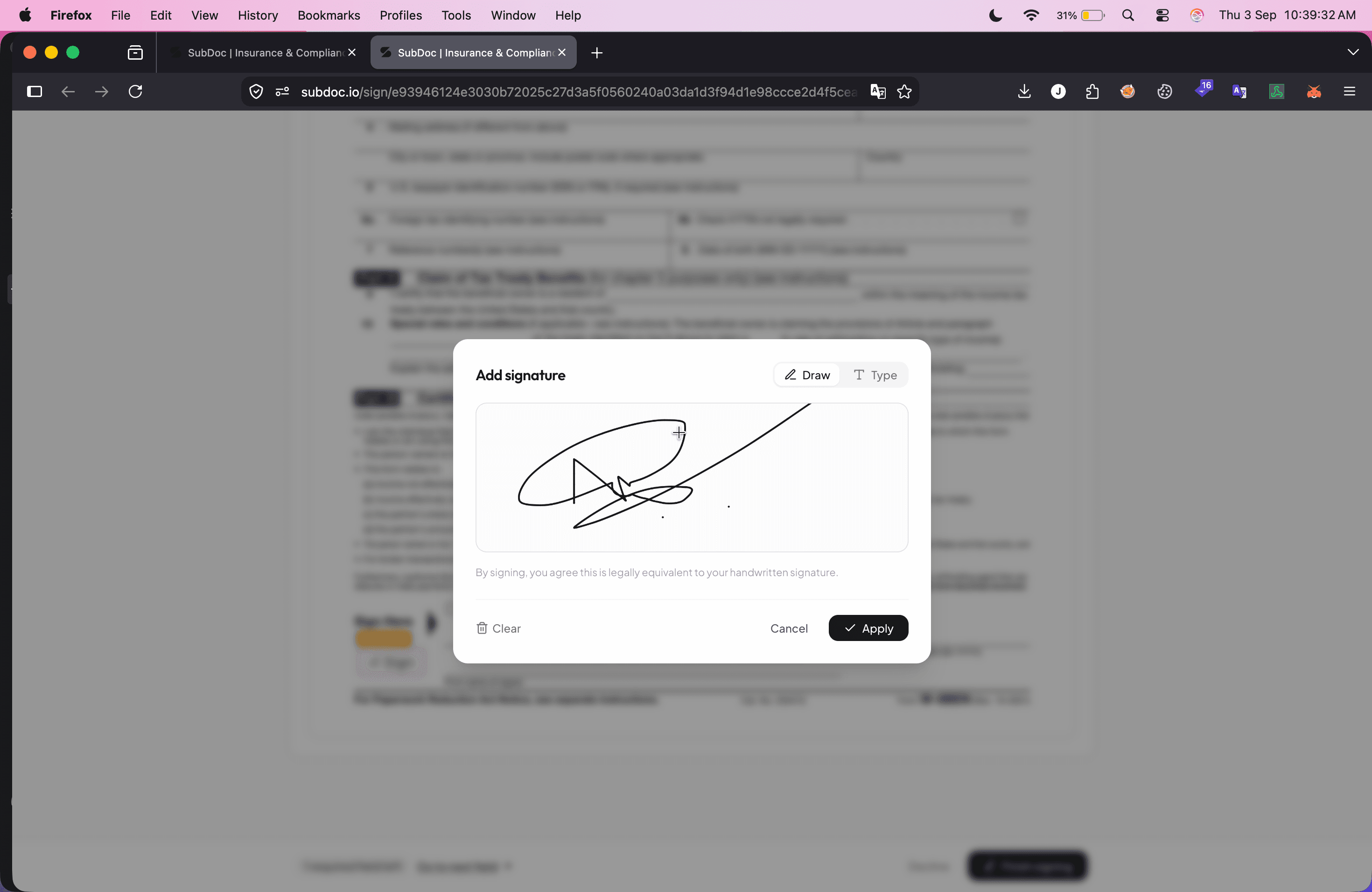
When the subcontractor opens the document, the interface highlights required execution lines. Clicking the signature box opens the responsive signature modal, offering options to Draw using a touch screen, mouse, or stylus, Type using legally compliant cursive typography, or Upload an image of a handwritten pen signature.
Review Stamped Signature, Finalize, and Store
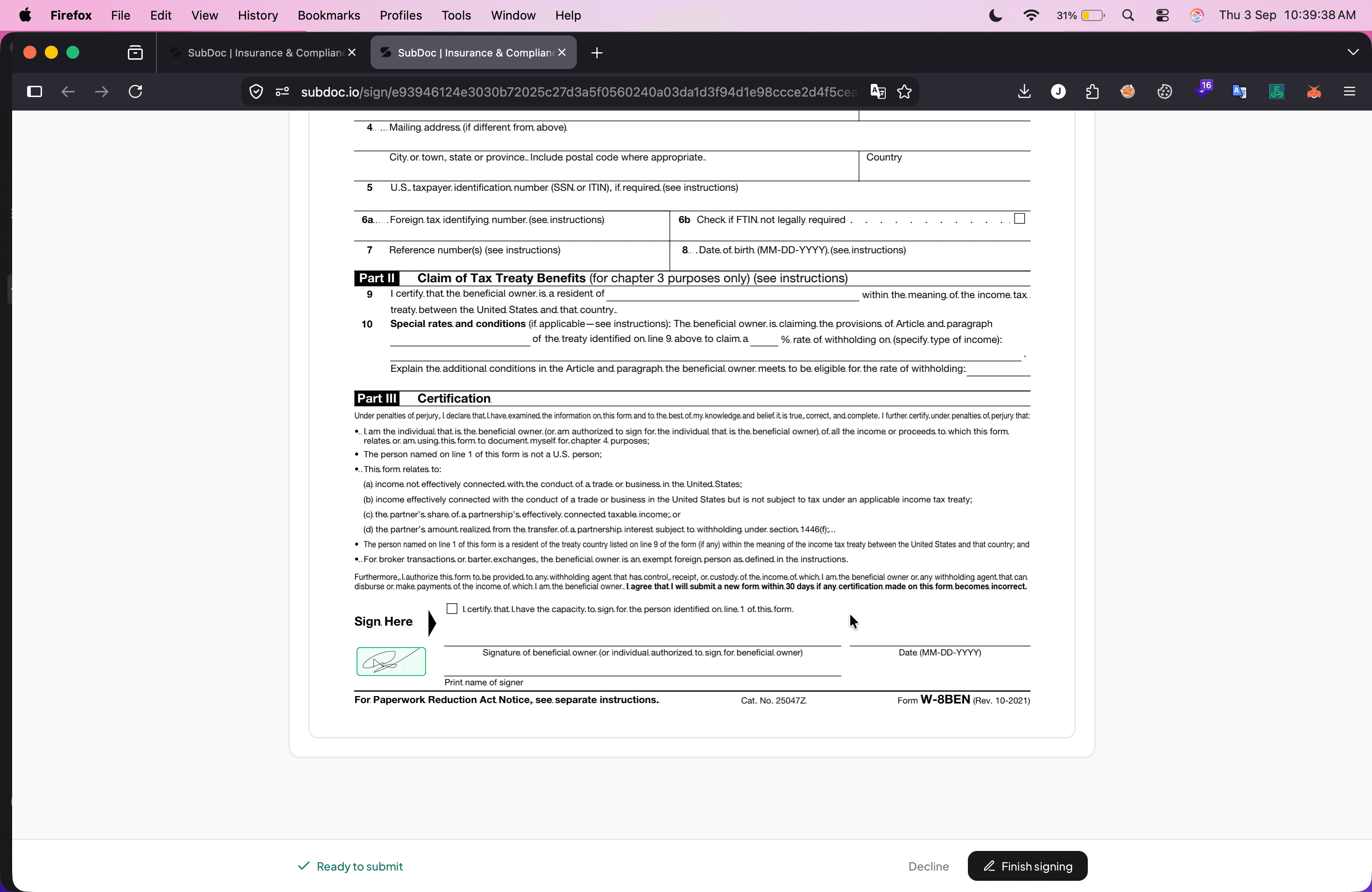
Once applied, the signature stamps cleanly onto the contract line, updating the status to Ready to submit with a prominent Finish signing button. Upon submission, SubDoc flattens the PDF, appends an audit certificate containing signer timestamps, IP addresses, and a cryptographic SHA-256 hash, and files the contract into the vendor's compliance profile.
Ready to simplify subcontractor agreements and document management?
Use SubDoc to send agreements for signature, collect W-9s, and keep all your contractor compliance documents organized in one place. Stop chasing paper contracts and eliminate compliance blind spots.
Frequently Asked Questions
Related Subcontractor Management Resources
Learn how to streamline contractor packet collection, W-9 filing, and trade compliance.
Protect your balance sheet with automated accounts payable holds when policies expire.
Extract policy limits and verify Additional Insured endorsements using AI OCR.
Download the standard operational checklist for vetting construction trade partners.